Announcing the Integration Module for Medusa
A new module for Medusa: plugins simply declare their settings, and admins manage them in the Admin, with no medusa-config edits and no redeploys.

At Gorgo, we've been building Medusa plugins for over a year, plugins that connect stores to payment providers, fulfillment services, and ERP systems. The same question kept coming up in every one of them: how do you pass a plugin its parameters, and how do you manage them? API keys, connection settings, and other user configuration are usually set through and environment variables, so any change requires a code edit and a redeploy. To avoid that, every plugin has to build its own UI, wire up an API, validate fields, and write workflows.
Today we're announcing the Integration Module for Medusa, which takes this chore away. Plugins declare their parameters in the module's provider, and the store admin manages them in the Admin through a generated interface, with no edits and no redeploys.
The problem with plugin settings
Configuring a Medusa plugin usually comes down to two problems, and both are harder than they should be.
- Managed through and env vars: Any change (a new API key, switching from test to live) needs code access and a full redeploy.
- Building the UI is hard: Proper settings management means forms and modals, field validation, API routes, and workflows, all written and maintained separately for every plugin.
What the Integration Module does
The Integration Module moves plugin settings out of code and into the Admin and the database. A plugin describes the settings it needs, a store admin fills them in under Settings → Integrations, and at runtime the plugin reads ready, validated values.
As an author, you only describe the settings schema; the module takes care of the UI, storage, encryption, and validation. And if a plugin needs something the generated UI doesn't support, you can create a custom widget.
How it works
You declare a descriptor with that lists your options and their types, the sections they group into, and the validation rules. From that single declaration, the Admin generates the settings page: the right control for each field, validation, conditional visibility, and masked secrets. You don't have to write any UI, CRUD API, or the associated workflows.
A minimal provider is a descriptor plus the class that ships it:
Values like are i18n keys, resolved through Medusa's standard localization, and the translations themselves live in .
Next, register the provider in :
Here sets the integration instance key. The same has to be passed to the consumer, a payment provider in this example. That's what the module uses to find and return the settings of the right integration. The two s are declared in independent places in the config, so you have to keep them in sync by hand, and it's easier to do that through a constant.
(here ) is the AES-256-GCM key the module uses to encrypt secrets at rest. Set it in your environment and keep it stable, since changing or losing it makes stored secrets unreadable.
At runtime, the plugin reads its parameters anywhere it runs with and gets back a typed, decrypted object. Incomplete or disabled settings don't resolve, so a half-filled draft is never returned.
What you get
One descriptor gives your plugin a complete settings interface:
- Settings management under Settings → Integrations, with no edits and no redeploys.
- Flexible option typing, conditional visibility, required fields, and validation rules.
- Secrets stored encrypted (AES-256-GCM), never sent to the browser.
- Support for multiple settings instances, for stores that have several accounts across third-party services.
- A "Test connection" button for verifying the connection.
- Custom widgets for the UI, when you need something beyond the standard form.
- A typed, already-decrypted config that resolves on demand.
For plugin authors
If you already maintain a Medusa plugin, moving to the Integration Module comes down to a simple port: move your existing options into the module provider's descriptor. And you read them with where you currently read environment variables or . We migrated all of our own providers this way (payments, fulfillment, and ERP), and you can browse a complete Medusa app with every provider wired up in the repository.
The step-by-step guide walks you through the whole migration.
Discover integrations in the Admin
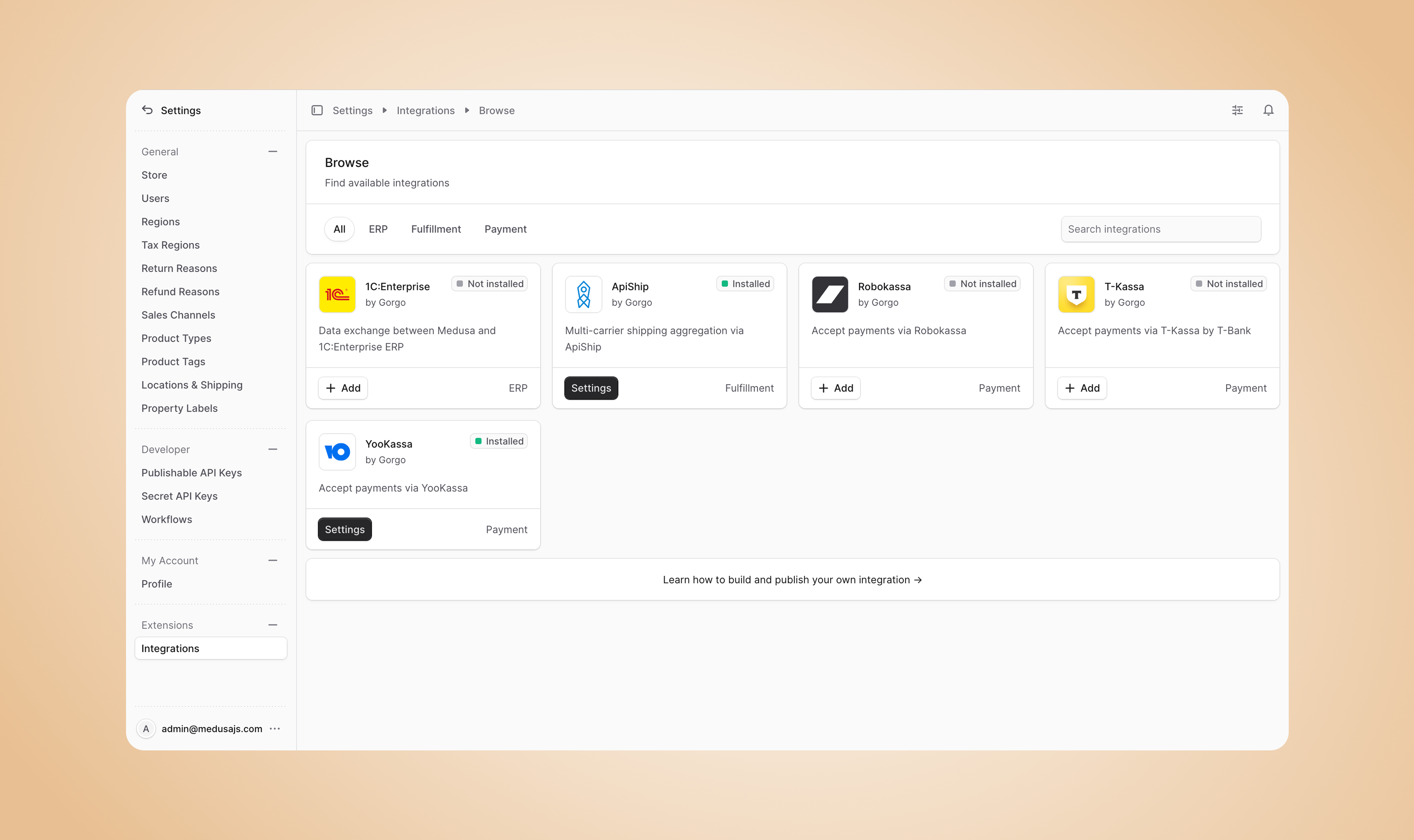
The module also displays a catalog of available integrations right in the Admin. Store admins can find your plugin and install it with a short guide. And because the settings UI is generated, your plugin looks clean and native, in the same style as the Medusa Admin.
Getting started
Install the module:
From there, declare your plugin's settings and other metadata, register it as an Integration Module provider, and switch it to read its parameters with . The full installation and usage guide is in the documentation, and the source is on GitHub.
What's next
The Integration Module is in beta, and we're actively developing it, adding built-in integrations and expanding the catalog. If you're building a Medusa plugin, we'll help you move over. If you run a Medusa store, give it a try and tell us what's missing.
Join the discussion in the Medusa Telegram community. Issues and Pull Requests are always welcome in the repository on GitHub.


