
Print trail
Print Trail fulfilment for Medusa v2: orders sent automatically, stock levels synced and tracking sent back to Medusa.
Print Trail for Medusa
is a Medusa v2 plugin that connects a Medusa store to the Print Trail API for automated order fulfilment of books and printed products.
- Orders containing Print Trail products are sent to Print Trail and confirmed automatically.
- Each Print Trail parcel comes back as a Medusa fulfilment and shipment, with its tracking number and its own shipment email.
- Stock levels, pre-orders included, are synced from Print Trail into Medusa inventory.
- Cancels, order edits, claims and exchanges made in Medusa are carried to Print Trail.
Website: printtrail.com. Guide: docs.printtrail.com/integrations/medusa.
Screenshots
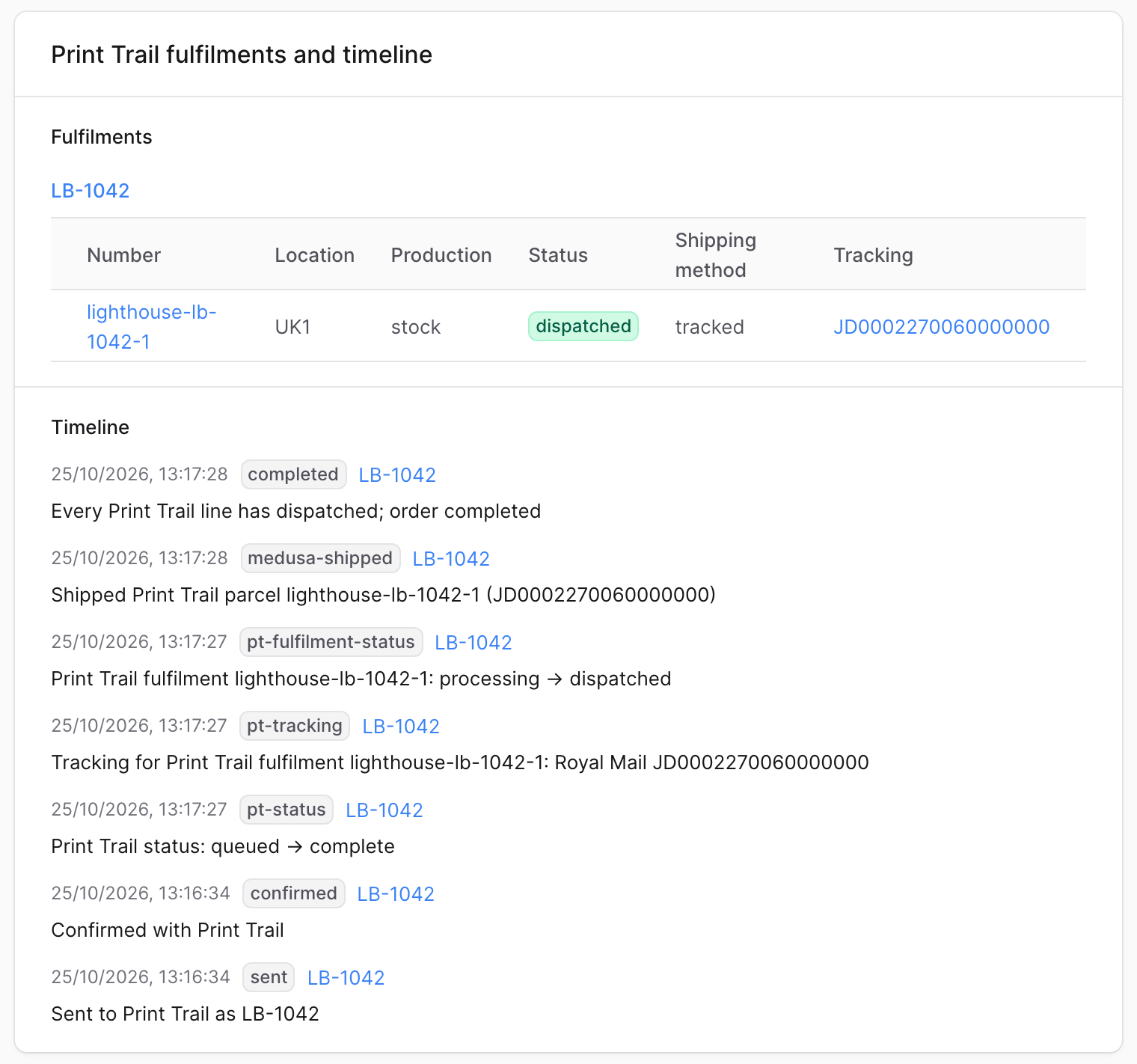
The order page: each Print Trail fulfilment with its tracking, and the order's Print Trail timeline.
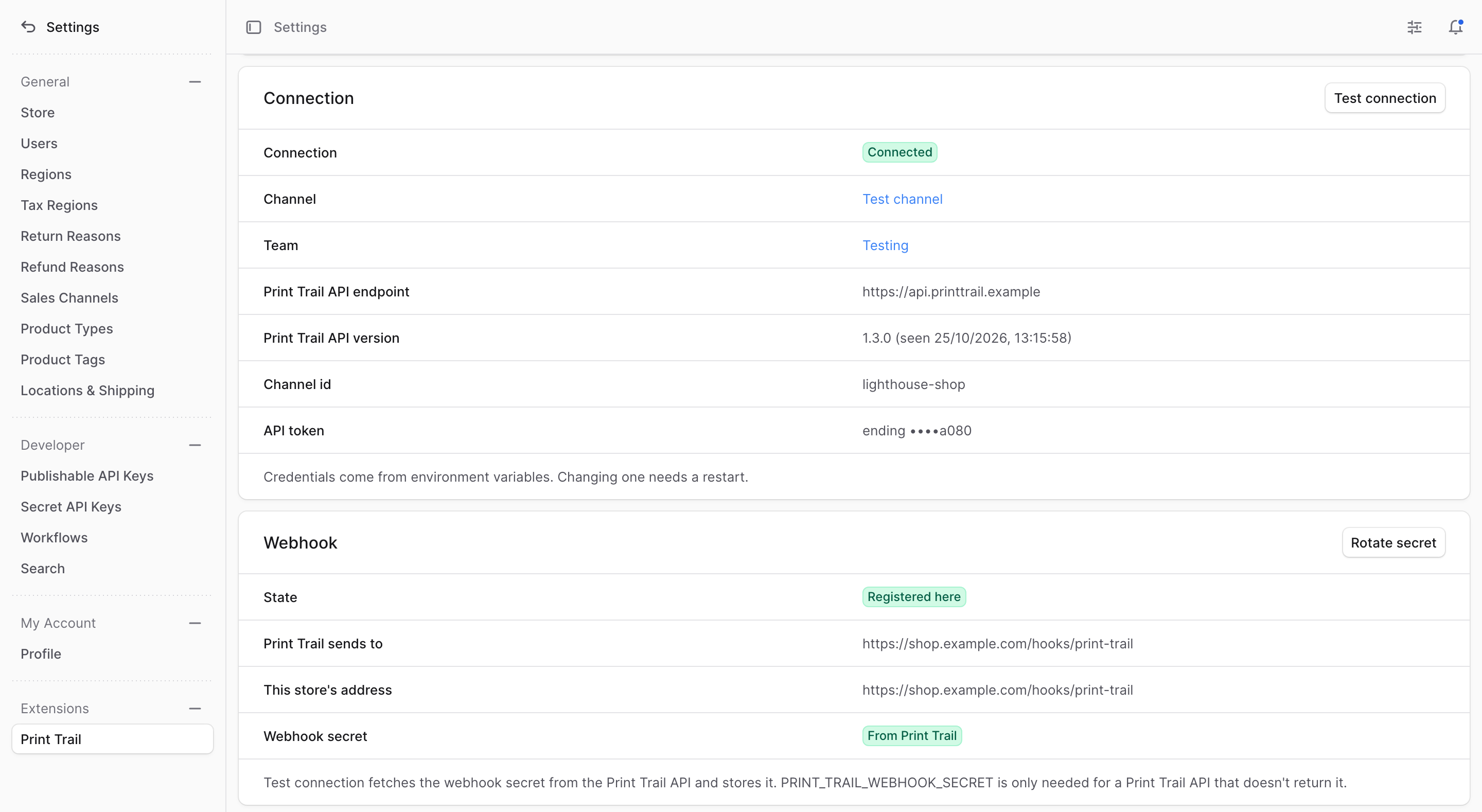
Settings → Print Trail: the connection and the webhook.
Requirements
- Medusa , tested on 2.17.2 and 2.22.1 with Node 22.
- A Print Trail account with a channel of its own for the store (not the Standard channel), and that channel's API token. Both are in the Print Trail app under Settings → Channels: Token on the channel's row creates the token, which is shown once.
- Redis locking (Medusa's Locking Module with its Redis provider) when the store runs more than one process (a server and a worker count as two). Without a shared lock, two processes can send the same order twice.
- An email provider in Medusa (a notification provider on the channel) for the shipment and admin emails. Without one, none is sent.
Setup
1. Install
In the store:
2. Configure
There are two blocks because Medusa passes a plugin's options only to the modules inside it, and a fulfilment provider is registered under the Fulfillment Module instead. reads the credentials once, so both blocks get the same values.
Setting replaces Medusa's default list, so keep the manual provider listed or the store's manual shipping options stop working. If the store already has an entry, add the Print Trail provider to it.
3. Set the environment variables
- : the store's Print Trail channel ID.
- : the channel's API token.
- (optional): leave it unset for the Print Trail API, . Set it only to use Print Trail staging or a mock.
- : this backend's public URL. Print Trail sends its webhooks to , and only to an URL on a public host, so a local store needs an HTTPS tunnel.
- : the Medusa admin URL, for links from Print Trail back to the order.
- : who is emailed when a Medusa cancel comes too late for Print Trail. A comma-separated list is accepted.
The plugin reads the three credentials itself; the other three are the names the config above passes through. Changing any of them later needs a restart.
4. Run the migrations and start Medusa
npx medusa db:migrateThey create the plugin's tables and its link to orders. Then start Medusa, or restart it if it's running, so it reads the variables.
5. Connect in the admin
- Go to Settings → Print Trail and press Test connection. It checks the token and channel, registers the store's webhook with Print Trail and fetches the webhook secret.
- Put the products Print Trail fulfils in a shipping profile of their own.
- On Settings → Print Trail, follow the Print Trail shipping options link and create a Print Trail shipping option for that profile, in a service zone whose fulfilment set is linked to a stock location.
Variants are matched to Print Trail by SKU. Where Print Trail's SKU differs, set it in the Print Trail panel on the variant page.
The business settings (the order number prefix, when orders are confirmed, the stock sync, the email templates and admin addresses, and the rest) can be changed on the Settings → Print Trail page in the Medusa admin, with no restart. A value saved there overrides the plugin options until it is reset.
Before taking live orders, cancel any open test orders (the plugin sends open orders with Print Trail lines from the reconcile look-back, 7 days by default and editable on the settings page), and switch payments and Print Trail credentials to live together.
Documentation
-
Guide: docs.printtrail.com/integrations/medusa, for setting the plugin up and using it day to day.
-
Reference: docs.printtrail.com/integrations/medusa-reference, for every option, rate cards, pre-orders, notifications, the workflows and hooks, events, jobs, API routes and troubleshooting.
-
Changelog, with each release's upgrade notes.
-
Contributing: developing and testing the plugin.
-
Problems and requests: GitHub issues.
Licence
The plugin is licensed under the PolyForm Shield License 1.0.0. The full terms are in , which ships with the package. In short, you can use it for anything except competing with it:
- Any store can install and run it, commercial stores included, at no charge.
- You can change it and pass on copies, changed or not, so an agency can install it for its clients. Whoever gets a copy from you must also get the licence terms and the line in .
- You can't use it to provide a product that competes with it, such as a Medusa integration for another fulfilment service built from this code.
The noncompete makes it a source-available licence, not an open-source one. This is a summary; the terms in decide.