

Category Thumbnail
Add category thumbnails to storefront
npm install @linearcommerce/medusa-category-thumbnail
Category
Built by
Version
0.0.3
Last updated
1 year ago
Monthly downloads
Loading downloads
Category Thumbnail
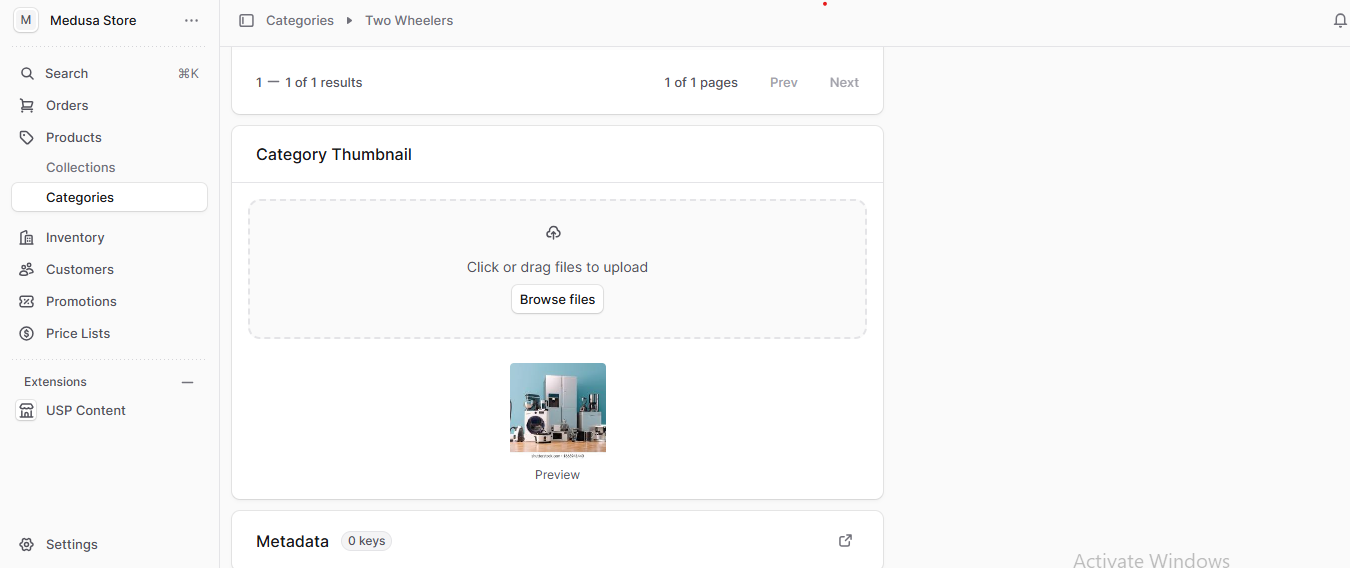
This plugin provides the ability to upload and manage a thumbnail image for categories, enhancing the visual representation of your catalog. By associating an image with each category, you can deliver a more engaging browsing experience and improve storefront navigation.
Previews
Dependencies
Install react-dropzone and multer
If you are using Local storage for file uploads, you just have to set below configurations inside plugins array in your medusa-config.js file
If you are using AWS S3 for file storage, you must have to install the following npm packages dependencies
Install aws-sdk/client-s3 and aws-sdk/s3-presigned-post
Add below environment variables in your .env file:
Add the plugin to your file:
Compatibility
To use this plugin, you need to have the minimum versions of the following dependencies:
Usage
Installation
Run the database migrations (Adds a table to your database for storing category thumbnails):
npx medusa db:migrateKey Features:
- Upload and manage thumbnail images at the category level.
- Seamlessly display category thumbnails on the storefront to enhance navigation and visual appeal.
- Maintain consistent branding and improve user experience with image-based category representation.
- Simply configure the file upload settings in the Medusa store, and the plugin will handle the rest automatically.
- Supports both local storage and Amazon S3 file upload providers for flexible file management.