
Siren medusa
Affiliate, referral and influencer programs for Medusa stores, tracking partner links and coupon codes to the order and rewarding partners through Siren Cloud.
Siren for Medusa: affiliate, referral and influencer programs
Run an affiliate or referral program on your Medusa store. Siren tracks partner links and coupon codes through to the order and works out what each partner earned.
Siren is affiliate and partner program software. This plugin connects your Medusa.js store to Siren Cloud, Siren's hosted service, where you run affiliate, referral, influencer and partner programs. Siren Cloud is a separate account you sign up for. Your programs, partners and rewards live there, and your store sends it the orders.
A partner shares a referral link or a coupon code. When a shopper uses it and places an order, Siren Cloud credits the partner by the rules of your program, such as a percentage of the sale or a flat amount. The reward waits until the order is paid, and it's worked out again if you refund.
Why Siren?
- One Medusa store can run several programs at once, such as an affiliate program, an influencer coupon program and a partner program, each with its own rates and its own partners.
- When the same shopper came through two partners' links, each program chooses who gets the credit: the newest partner, the first, every partner, an even split, a split weighted by the points your program gives each kind of referral, or the partner with the top score.
- Programs that could both pay on one order, such as an affiliate program and an influencer program that both include a partner, can go in a program group. The group pays only one of them, the newest or the oldest partner's program as you choose.
- Siren Cloud works out each reward from the parts of the order your program counts, such as its line items. It waits until the order's payment is taken in full (captured, in Medusa's terms), and works the reward out again after a refund.
Program types
- Affiliate programs. Partners share a referral link or a coupon code and earn a percentage of each sale they bring in, or a flat amount per order.
- Influencer and creator programs. Give each creator their own Medusa promotion code. An order that uses it credits them with no link click needed, unless the shopper arrived through another partner's link first.
- Referral programs. Invite customers who want to recommend you to join as partners, give each one a link or code, and pay them for the friends who buy.
- Partner and reseller programs. Invite partners yourself or let them apply through an application form that Siren Cloud hosts, then pay a commission on the sales each one brings in.
- Sales team programs. Give each rep their own code, pay them on the orders it brings in, add an override for their manager through a reporting line, and share a bonus pool on a schedule, split by each person's sales.
Some features, such as overrides, lifetime commissions, and PayPal or Stripe payouts, depend on your Siren Cloud plan. See plans and pricing.
What you can do with Siren on your Medusa store
- Give each affiliate or partner a referral link and credit them for the orders it brings in. Your storefront remembers the referral for 30 days, so a shopper can come back and buy later.
- Credit an influencer or creator when a shopper uses their coupon code at checkout, with no link click needed.
- Reward partners for paid orders. Siren Cloud treats an order as done once its payment is captured in full, and then approves the reward or holds it for your review, as your program says.
- Keep rewards right after refunds. A refund or a canceled order reaches Siren Cloud, and the partner's reward is worked out again on what the customer kept.
- See every referred sale and every partner's rewards in Siren Cloud. Siren Cloud keeps track of what each partner is owed, and you pay them by running a payout there.
- Give partners their own Siren Cloud portal, where they sign in to follow what they've earned.
Screenshots
These show Siren Cloud, where your programs run, with sample data.
-
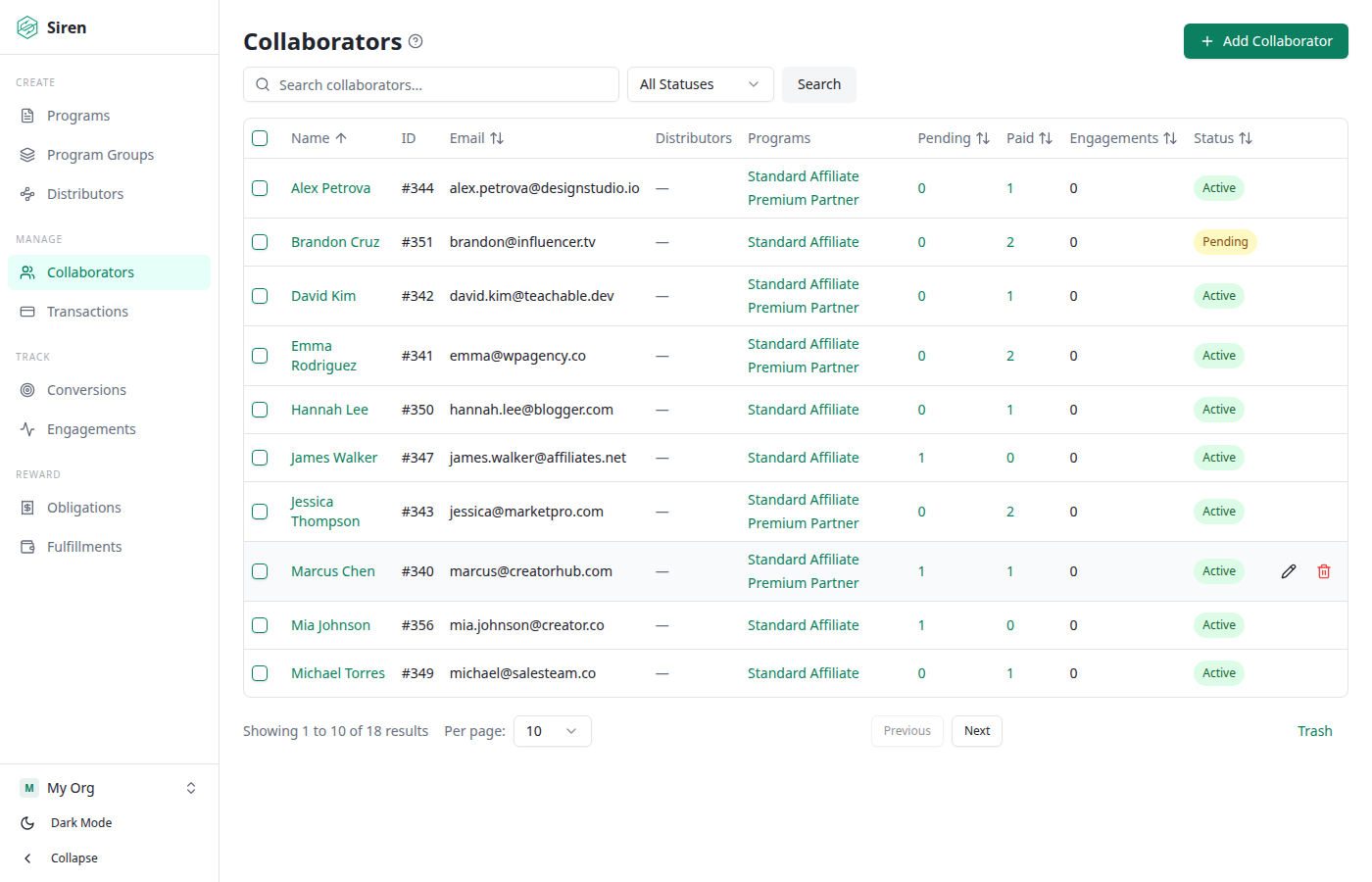
Partners, with each one's referral code, programs, bonus pools and paid and unpaid rewards.
-
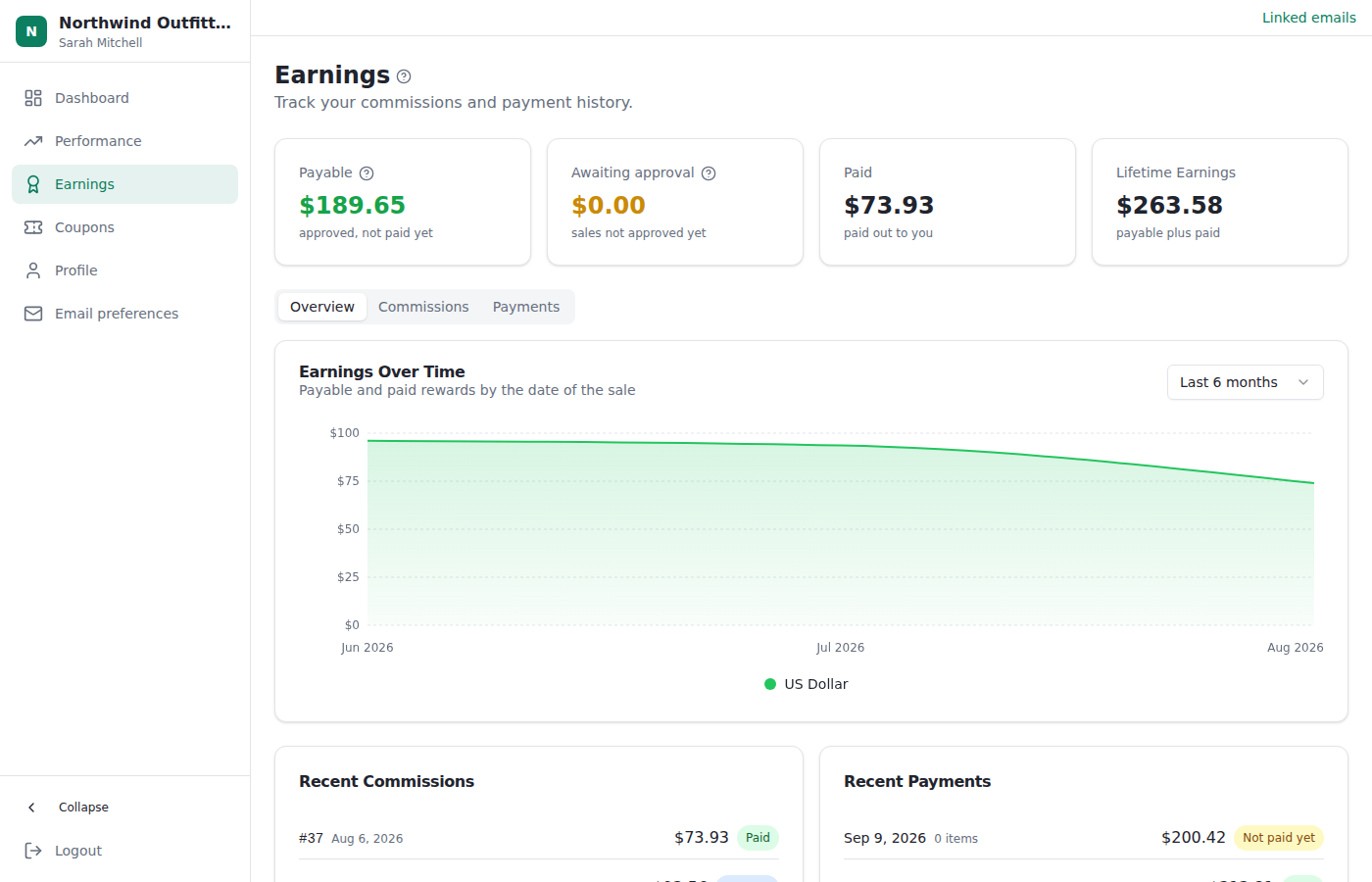
A partner's own portal, with what they've earned, what's waiting for approval and what's been paid.
-
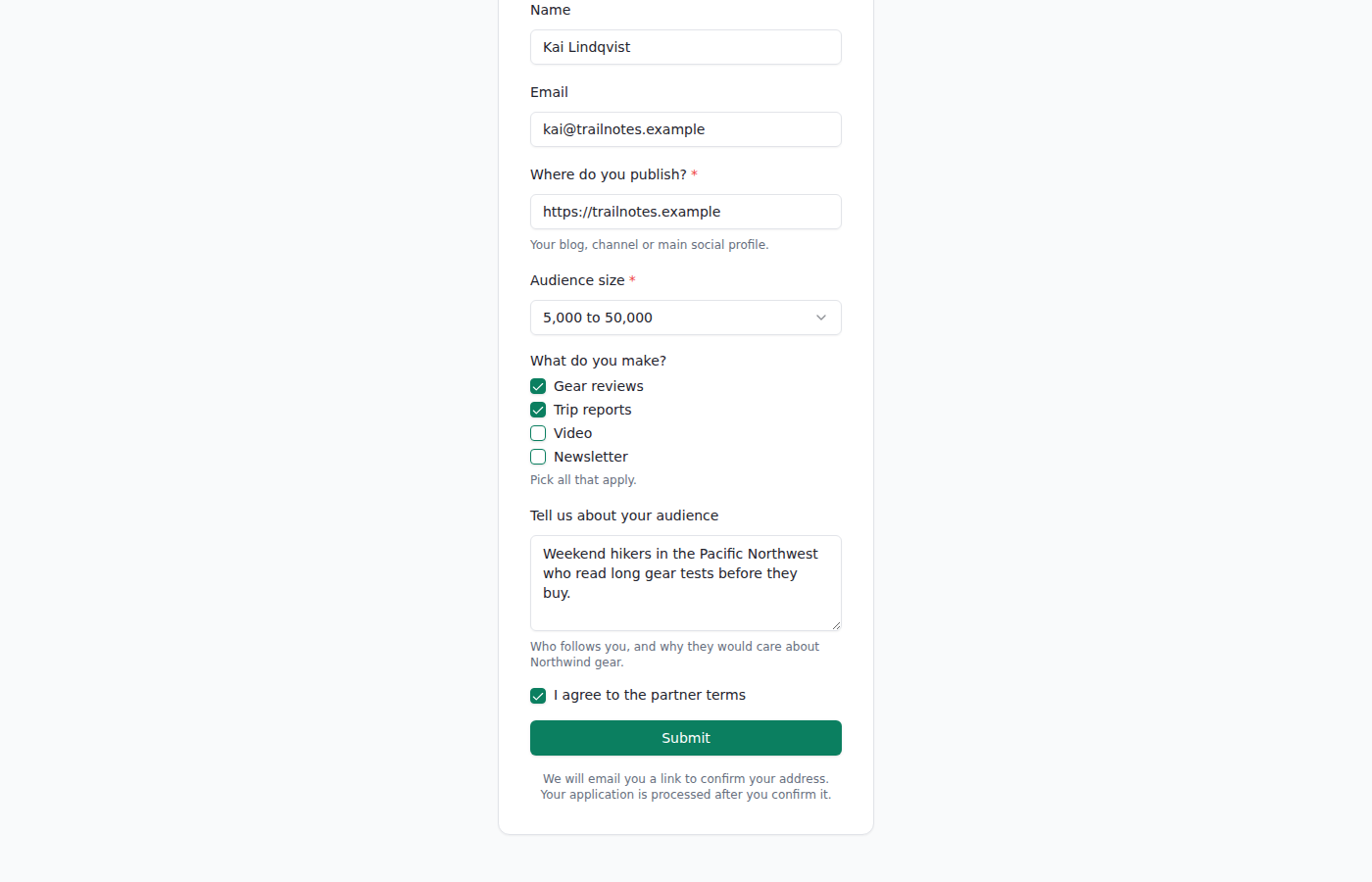
The application form that Siren Cloud hosts for people who want to join your program.
-
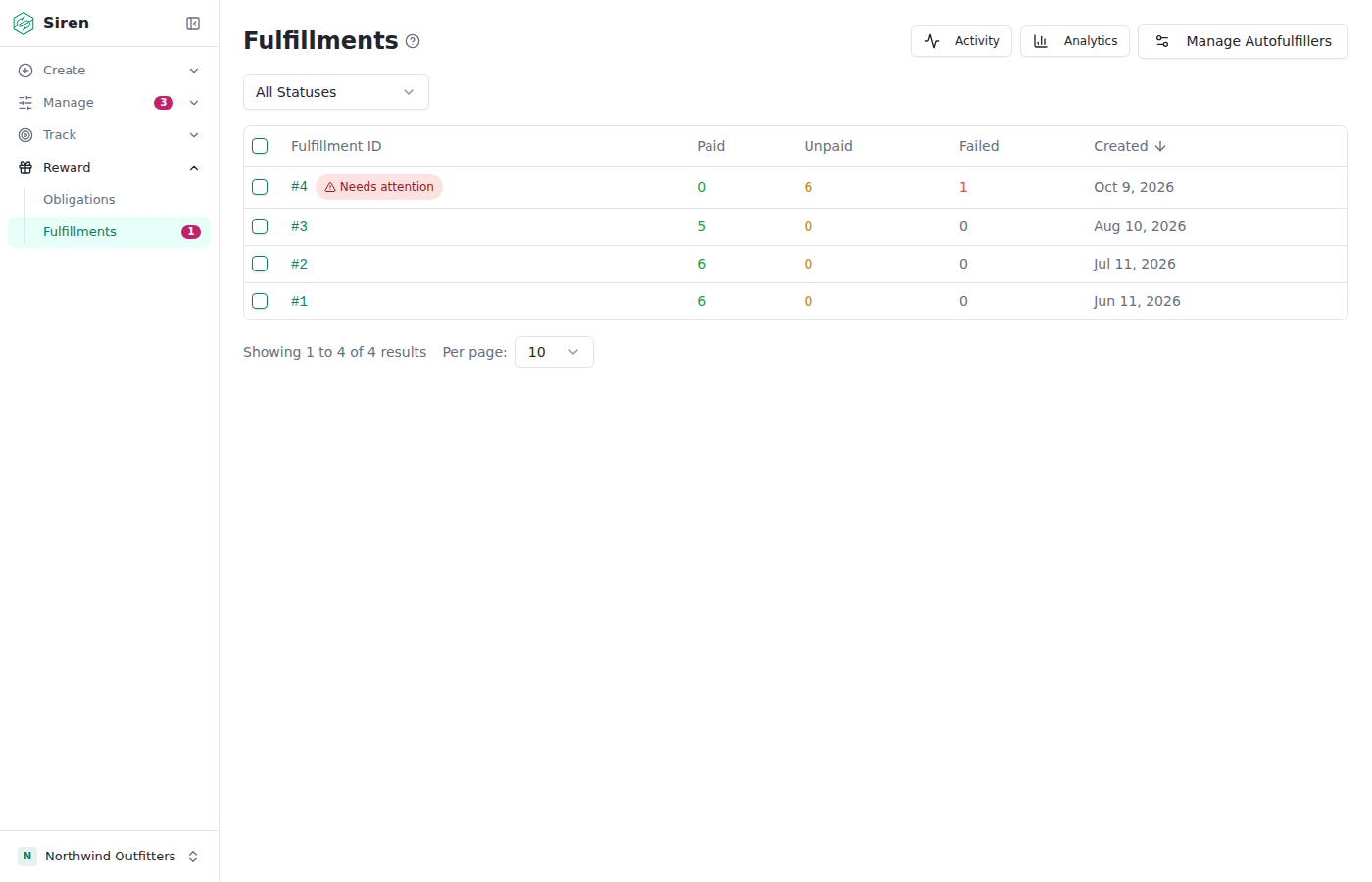
Payouts, with what's been paid, what's unpaid and what needs attention.
How it works
- You connect your Medusa store to Siren Cloud from the Siren page in your Medusa admin.
- A shopper arrives through a partner's referral link. Your storefront records the referral and keeps it with the shopper's cart until they order. A coupon code needs no link at all.
- When the order is placed, your store sends it to Siren Cloud, which works out who referred it and what they stand to earn.
- When you capture the order's payment in full, Siren Cloud marks the sale complete and approves the reward, or holds it for your review. A later refund changes it.
Your store also sends refunds, customers, products and promotion codes to Siren Cloud, and keeps them up to date as they change.
What you see in your Medusa admin
Siren adds a page to your Medusa admin. Open Settings, then Siren in the Extensions list. It shows:
- whether the store is connected, and to which Siren Cloud account
- whether Siren Cloud can reach your store, and whether your orders are being sent
- your Siren Cloud plan
- how many updates (orders, refunds and other changes) are waiting to send or have failed, with a button to send failed ones again
- the 20 most recent orders that Siren Cloud could not credit to any partner, each linked to the order
- a button to disconnect the store
If Siren Cloud can't reach your store, the page says why and offers a Check again button.
Requirements
- A Medusa 2 store on version 2.22 or later, running Node 20.19 or later. Your developer can check both in your Medusa project.
- A live store address that Siren Cloud can reach over https
- A Siren Cloud account. See plans and pricing.
- For referral links, a storefront built on Medusa's JavaScript SDK, such as Medusa's Next.js starter, and a developer to add a few lines to it. Coupon codes work without that.
Install and connect
Steps 1 to 3 change your Medusa project, so they're for whoever looks after your store's code. Steps 4 to 6 happen in your browser.
-
Install the plugin in your Medusa project:
-
Add it to the list in your , with your store's address and an encryption key:
The key protects the connection's secrets in your database. makes one. Keep it with your other secrets, and keep it the same from then on.
-
Add Siren's tables to your database, then restart Medusa:
npx medusa db:migrate -
In your Medusa admin, open Settings, then Siren, and click Connect to Siren Cloud. Sign in to Siren Cloud and approve the connection.
-
Back on the Siren page, wait a minute or two until it reads "Siren Cloud can reach this store." and "Siren sends this store's orders to Siren Cloud."
-
Set up your program and invite your partners in Siren Cloud.
Then ask your developer to add the storefront helpers, so referral links are tracked.
For your developer
Referral links need a few lines in the storefront, which is developer work. One call records the referral when a shopper lands on a page through a partner's link. Another attaches it to the shopper's cart, so the order carries it. In Medusa's Next.js starter that means one change to the middleware and two to the cart code. Both helpers come from and have been tested in that starter.
The developer guide, which ships in this package, has the storefront wiring, every plugin option, the events Siren Cloud sends your store and the scheduled jobs.
Frequently asked questions
How do I start an affiliate program on my Medusa store?
Install this plugin, connect your store from the Siren page in your Medusa admin, and create your program in Siren Cloud. Siren Cloud holds your programs, partners and rewards. Your store sends it the orders.
Can I track influencer coupon codes in Medusa?
Yes. Siren sends your Medusa promotion codes to Siren Cloud. When a shopper types a code that belongs to a partner in Siren Cloud, the order credits that partner, with no link and no storefront change. If the shopper arrived through another partner's link first, that link's partner gets the credit.
Does Siren work with a headless Medusa storefront?
Yes. Your developer adds two small helpers to the storefront, and they work in any storefront built on Medusa's JavaScript SDK. They've been tested in Medusa's own Next.js starter.
Can I run more than one affiliate program on my Medusa store?
Yes. Each program has its own rate, its own rule for sharing credit and its own partners. Two programs can both pay on the same order, or you can put them in a program group so that only one pays.
What attribution models does Siren support?
Each program picks one. It can pay the partner who reached the shopper last, the one who reached them first, or every partner. It can also split one reward evenly, split it by the points your program gives each kind of referral, or give it all to the partner with the top score.
Does Siren support multi-tier or override commissions?
Yes, as overrides up a reporting line. You arrange partners in reporting lines up to five levels deep, and an override program shares its reward between the partner who made the sale and the people above them, by weights you set for each level. Overrides depend on your Siren Cloud plan.
Can a partner keep earning on a customer's later orders?
Yes. These are lifetime commissions, and they depend on your Siren Cloud plan. When your program is set to link a referred customer to their partner, or you link them by hand, that customer's later orders credit the same partner. It works for customers with an account in your store. A guest checkout has no account to link.
How do I pay my affiliates?
Siren Cloud keeps track of what each partner is owed. When you run a payout, it groups what's owed for each partner. You can export the payouts as a CSV file for your own payment method and mark them paid, or pay through PayPal or Stripe, depending on your plan.
Can partners apply to join my program?
Yes. Siren Cloud hosts an application form you can share. You can review each applicant, or let the form approve them once they confirm their email address. Approved partners sign in to their own portal.
Can I pay a bonus to my best partners?
Yes. A bonus pool pays out on a schedule you set and splits the pool among the partners in it, for example by the sales each one brought in that period.
When is a partner's reward approved?
When the order's payment is captured in full, or Medusa marks the order completed. A program set to approve automatically approves the reward then. Otherwise it waits for you to review it. A partial capture approves nothing until the rest is captured, and until then Siren Cloud shows what the partner stands to earn.
What happens when I refund or cancel an order?
For an order Siren Cloud recorded, Siren sends each refund, including partial refunds. If the reward was already approved, Siren Cloud works it out again on what the customer kept. A canceled order counts as a full refund.
Why don't some orders show up in Siren Cloud?
Siren Cloud records an order only when it can tell who referred it: a partner's referral link, a partner's coupon code, or a customer with an account whom a partner referred before. Other orders have no partner to credit, so Siren Cloud keeps nothing for them. Your sales totals stay in Medusa. The Siren page in your Medusa admin lists the 20 most recent of these orders, so you can check one you expected to see credited.
Does Siren slow down my storefront?
A shopper who arrives without a referral link makes no extra calls. When a shopper arrives through one, the landing page waits at most three seconds while the referral is recorded. After that, each item they add to their cart makes one small extra update.
What store data does Siren Cloud receive?
Orders with their line items and totals but no email or address, refunds with the note you typed, promotion codes, products, and the customers who have an account in your store. Customers arrive with their name and a hashed copy of their email address, a one-way scrambled form that isn't the address itself. Your store also reports its connection status to Siren Cloud once a day.
What happens if I disconnect my store?
Siren stops sending orders to Siren Cloud, and new referral visits aren't recorded until you connect again. Orders placed while the store is disconnected wait in your store and reach Siren Cloud when you reconnect. Once Siren Cloud has started receiving your orders, the store can only connect again to the same Siren Cloud account.
Siren Cloud says "collaborators". Who are they?
That's Siren's word for the people you reward: your affiliates, influencers and other partners. This page calls them partners.
What does Siren cost?
See plans and pricing on the Siren website. Your plan shows on the Siren page in your Medusa admin.
Support and links
- Help with Siren: contact Siren support
- Siren documentation: sirenaffiliates.com/documentation
- Siren website: sirenaffiliates.com
- Developer guide: unpkg.com/@novatorius/siren-medusa/docs/developer-guide.md
- Changes in each version: unpkg.com/@novatorius/siren-medusa/CHANGELOG.md
License
MIT.