YooKassa v2.0: settings in the Medusa Admin
In the new version of @gorgo/medusa-payment-yookassa we moved settings out of medusa-config and into the Admin, powered by the Integration Module. Here's what changed and how to upgrade.

We've released version 2.0 of the plugin. Its headline change is a settings page in the Medusa Admin, built on our Integration Module. YooKassa credentials, online receipt options for fiscal law (54-FZ), and payment behavior are now filled in by a store admin directly in the Admin, with no code edits and no redeployment.
The Integration Module moves plugin settings out of code and into the Admin and the database. A plugin declares which options it needs and how they are displayed, and from that declaration the module generates the settings page, stores the values, encrypts the secrets, and returns validated configuration at runtime.
A plugin author no longer writes forms, API routes, and workflows to manage settings. A store admin no longer needs code access to rotate a key or turn on receipts.
Before
Every option was set in and environment variables. Any change meant editing code and redeploying the Medusa application:
After
The same options live on the Settings → Integrations → YooKassa page, split into three sections: credentials, payment behavior, and receipts. Values are stored in the database, and changes take effect as soon as you save.
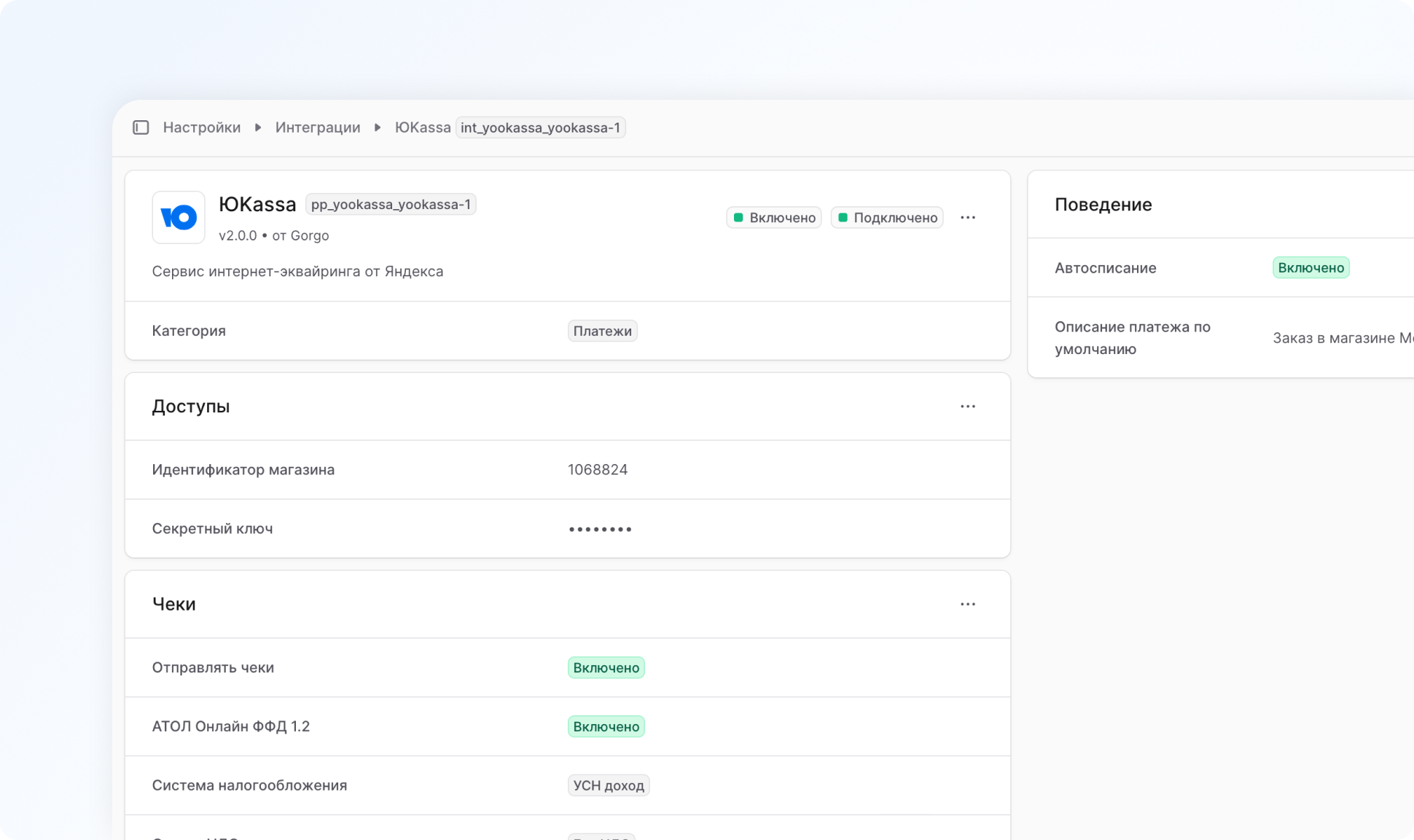
What the settings page gives you
The settings page does more than repeat the old list of options.
- Secrets are encrypted at rest. The secret key is stored encrypted (AES-256-GCM) and is never sent to the browser.
- Fields appear as needed. Receipt options show up only when receipt generation is on, and the tax system is asked for only when you work with ATOL Online and FFD 1.2.
- Connection test. The Test connection button calls the YooKassa API with the credentials you entered and tells you right away whether they work.
- Several accounts at once. If your store works with more than one YooKassa account, you can create a separate integration instance for each.
- Changes without a restart. The plugin reads its settings on every operation, so a new key or a toggled auto-capture applies immediately.
Breaking changes
Version 2.0 is not compatible with 1.x in how it is configured. What to keep in mind:
- is now a required dependency. The plugin will not start without it.
- Provider options in are no longer read. , , , , , , and the rest are ignored. The payment provider now takes a single option, , pointing at the integration instance.
- Values have to be entered again. Nothing is migrated automatically from into the database, so you fill the options in once in the Admin.
- An encryption key is required. The variable is mandatory. Set it once and don't change it, or stored secrets become unreadable.
- Payments won't work until the integration is configured. If required options are missing or the integration is disabled, the plugin returns an error instead of creating a payment. Fill in the settings right after upgrading.
The webhook URL doesn't change, so there is nothing to reconfigure in your YooKassa account.
The 1.x setup guide stays available here.
How to update
Upgrading takes a few minutes. The plugin requires Medusa v2.17.2 or newer.
Step 1. Install the Integration Module and the latest plugin version
Step 2. Update
Register the integration provider under the Integration Module and link the payment provider to it through a shared identifier. The old payment provider options can be removed:
The constant ties the two config entries together. The module uses that identifier to find the right integration instance and hand its options to the payment provider.
Step 3. Set the encryption key
The module uses this key to encrypt secrets in the database:
INTEGRATION_ENCRYPTION_KEY=supersecretStep 4. Fill in the settings in the Admin
- Open Settings → Integrations → YooKassa.
- Enter the shop ID and the secret key in the Credentials section.
- Turn on receipt generation in the Receipts section and set auto-capture in the Behavior section, if you need them.
- Click Test connection and confirm the credentials are valid.
- Enable the integration.
After that the and environment variables can be removed. Full installation instructions and a complete option reference live in Getting Started and Managing settings.
What's next
- The 1.x line stays on npm and receives critical fixes only through the end of 2026. No new features are coming to it, so we recommend moving to 2.0.
- We keep developing the Integration Module, adding new field types and more capabilities on the settings page, and growing the integrations catalog in the Admin. It's worth updating regularly. Every release goes through unit, integration, and contract tests, and compatibility with the YooKassa API is checked daily, so you can trust new versions. We wrote separately about how our testing works.
- The rest of our providers already run on the module in beta: T-Kassa, Robokassa, ApiShip, and 1C. Stable 2.0 releases for them are coming in the next few releases.
Support and the Medusa community
Ask questions and discuss Medusa in the Telegram community, report plugin issues in the Gorgo support chat, or open Issues and Pull Requests on GitHub.


