
Fulfillment zone rate
Calculated shipping for Medusa v2: rate per kg by destination zone on the chargeable weight (actual vs volumetric), with shipment tracking, tracking page and A6 labels — by Haus Kayu


medusa-fulfillment-zone-rate
Calculated shipping for Medusa v2: price per kilogram by destination zone on the chargeable weight (the larger of
actual and volumetric), plus shipment tracking with own tracking numbers, a status timeline, a public tracking page,
a mobile-first Admin and A6 labels. Built and used in production by Haus Kayu.
Ongkir terhitung untuk Medusa v2: tarif per kg menurut zona tujuan, dari berat tagih (yang lebih besar antara berat
aktual dan berat volume), plus pelacakan kiriman. Dibuat dan dipakai sendiri oleh Haus Kayu.




Compatibility
| Plugin | Medusa | Node | Tested in CI on |
|---|---|---|---|
| 0.3.x | 2.19.0 or newer 2.x () | 20.19+ or 22.12+ | Medusa 2.19.0 and 2.22.2 |
Quick start
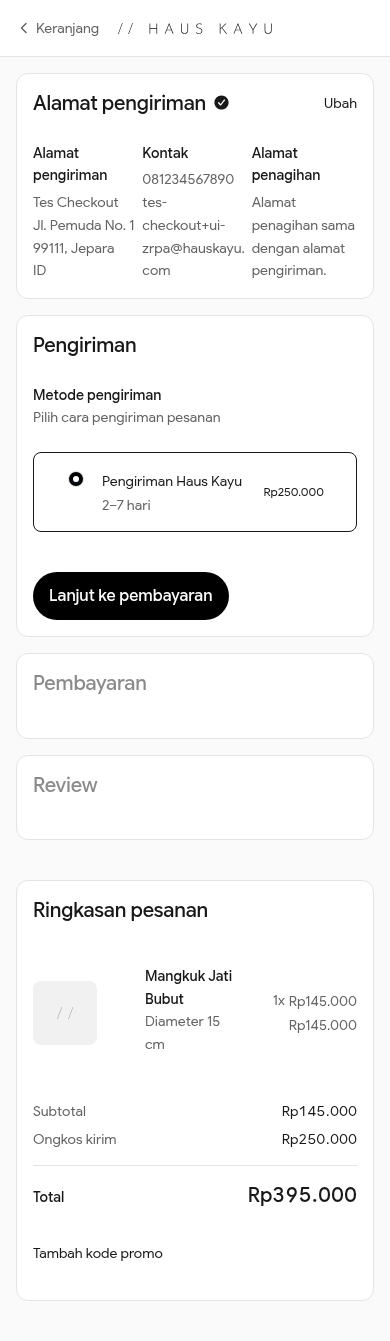
In the Admin, add the zone-rate provider to your stock location and create one shipping option per service with price type Calculated. Full steps: Install · Config · Tracking.
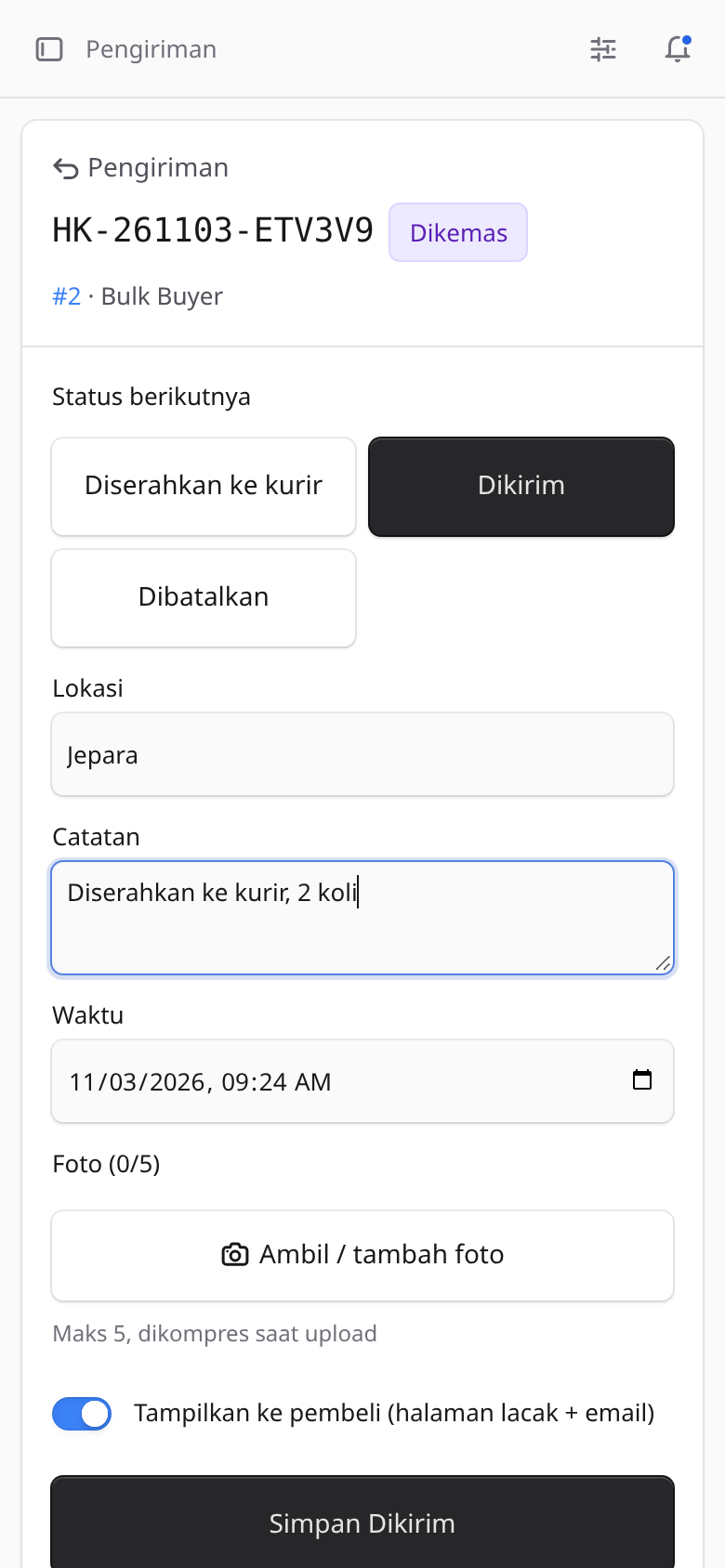
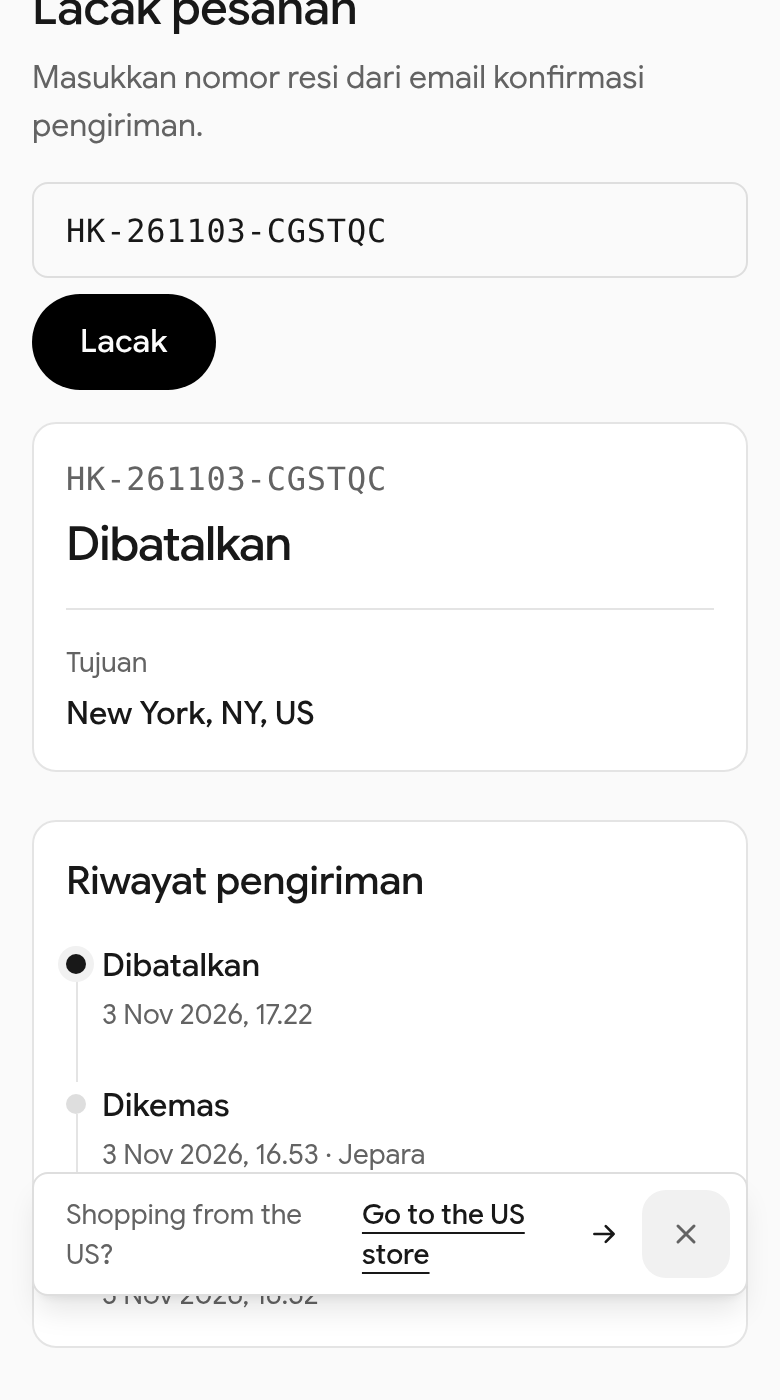
| Checkout | Admin (phone) | Tracking page |
|---|---|---|
 |  |  |
| A6 label | Packing slip | International checkout |
|---|---|---|
 |  |  |
English
What it does
-
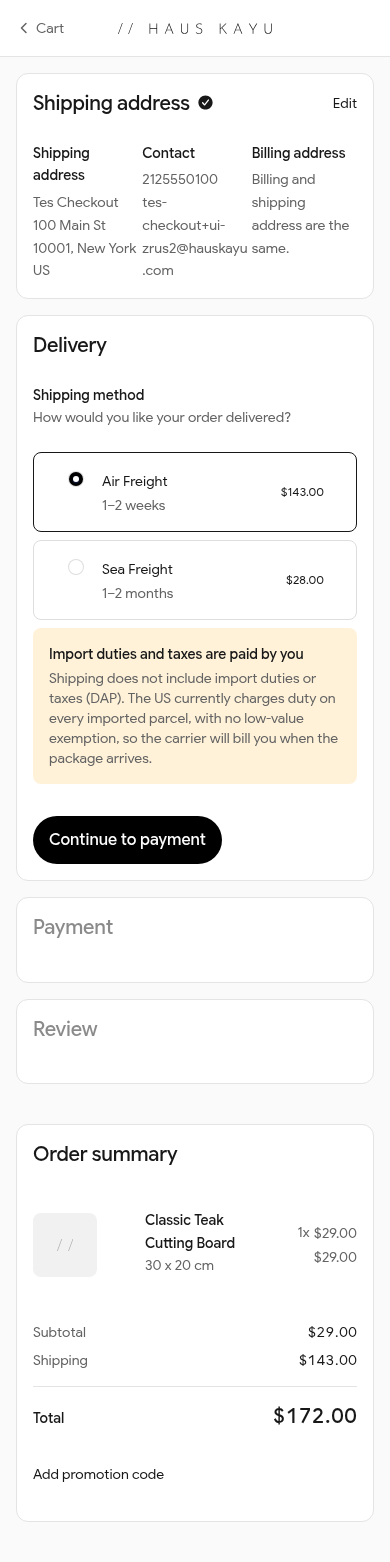
Fulfillment provider with calculated prices (): the price comes from the cart and the shipping address, never a flat amount.
-
One config file holds every service, zone, rate, divisor and estimate. Each service (e.g. domestic, air, sea) is one fulfillment option, so one shipping option in Medusa.
-
Chargeable weight, the same for every service:
Integer arithmetic only (milligrams, 0.01 mm steps, whole currency units), so floats never push a parcel into the next kilogram. The divisor defaults to 6000 and can be set per service. Units default to grams and centimetres.
-
Product fallback: a variant without weight or dimensions uses its product's values (option, on by default).
-
Never 0: shipping is refused with a clear message (English/Indonesian) when the destination is unknown or a line has no weight or misses a dimension. Checkout shows the message and the option cannot be added.
-
Rejection log in the Admin (time, cart, reason, the province as typed, the variants at fault), with repeats for the same cart counted on one row.
-
Incomplete variants report in the Admin: every variant without weight or a dimension, with a link to edit it and a CSV export.
-
Tolerant province matching for Indonesia: the 38 provinces by ISO 3166-2 code (, ), official and English names, common abbreviations (Jabar, Jateng, DIY, NTB, Kaltim, Sulsel, Kepri, Babel …), old and new spellings (Sumatra/Sumatera, Jogja), with or without "Provinsi"/"Prov.", any case and spacing.
-
Fixed exchange rate for carts in another currency: rates stay in your base currency, the price is converted and rounded up to a whole unit. The rate and the date you set it are shown in the Admin.
-
Admin pages in English and Indonesian; a small "by Haus Kayu" credit you can turn off.
Tracking
- Shipment per order, created when the payment is captured (option : , or ), or from the order page in the Admin. Automatic creation happens once per order: never for canceled, archived or draft orders, never again after a shipment existed (also a canceled one), so replayed events are harmless; an admin can re-issue one after a cancellation.
- Tracking numbers like : prefix, ship date (store time zone), five random symbols and a check symbol that catches every single-symbol typo; unique in the database. A third-party carrier's name, number and link can be added alongside.
- Statuses → → / → → → → , plus , , (labels in English and Indonesian). Add or relabel statuses with ; other transitions are refused.
- Medusa in step: a shipped status creates the Medusa fulfillment and shipment (label = our tracking number), marks it delivered, cancels an unshipped fulfillment.
- Payment before shipping (optional, off by default): with the shipped statuses (, , or your own with ) are refused while the order still has an outstanding amount (total minus captured payments), for stores that bill in parts (deposit + balance). Other statuses are not affected. Authorized-but-not-captured payments count as outstanding.
- Timeline (append-only): status, note, location, time, admin, shown-to-buyer, up to 5 proof photos per update (compressed on the server to WebP, longest side 1600 px, EXIF/GPS removed; stored in the database, not public).
- Live: open tracking pages and Admin pages update over Server-Sent Events (Redis pub/sub across processes when Redis is configured), with 30-second polling as fallback.
- Events and for your own subscribers (WhatsApp, Slack …).
- E-mails to the buyer for every status shown to them, through the Notification Module (English/Indonesian templates you can replace, one e-mail per event); skipped quietly without a provider.
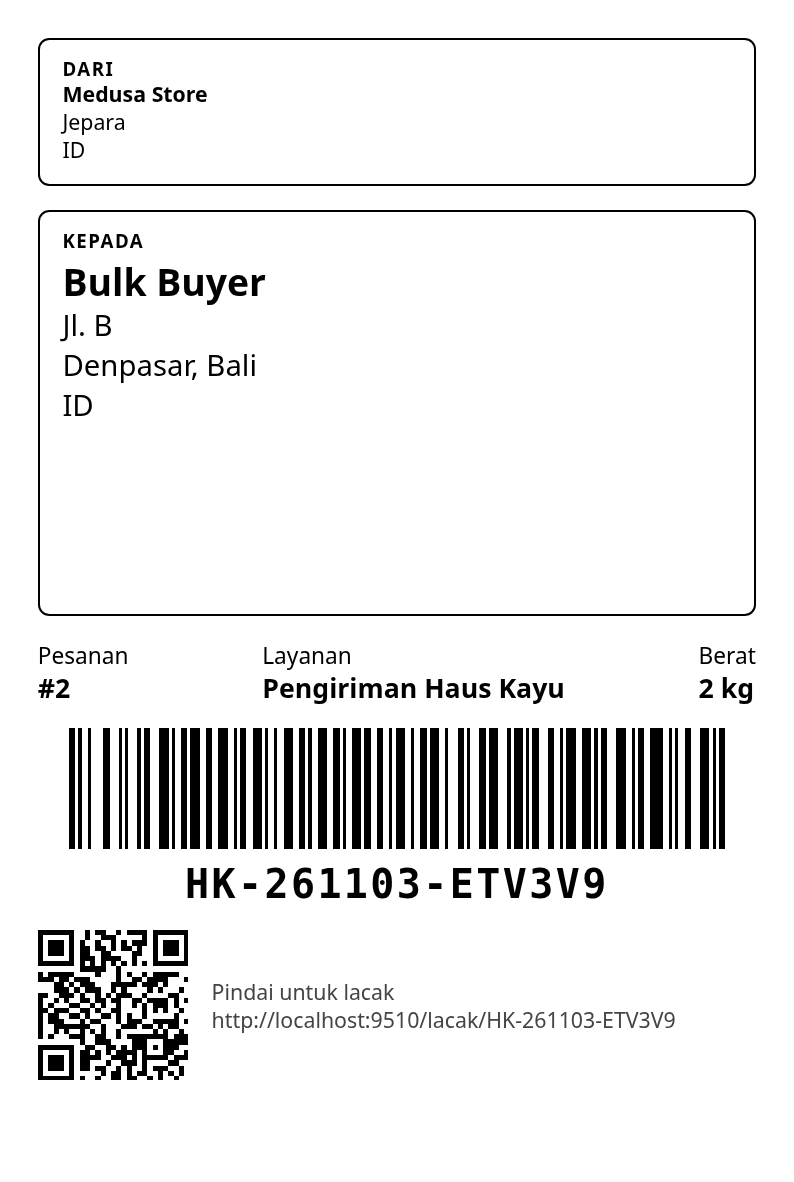
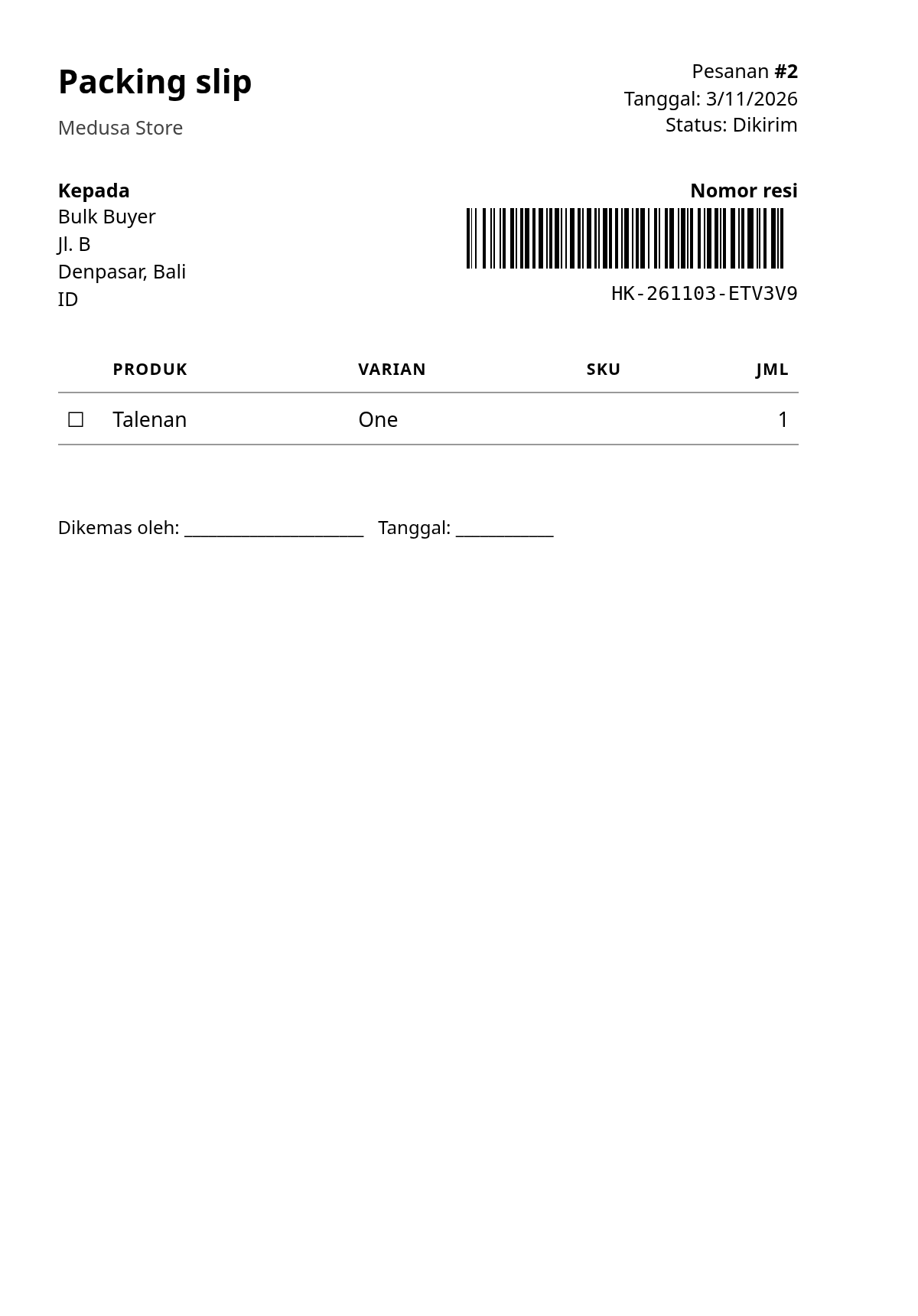
- Admin (sidebar → Shipments): counts per status, late and shipped today; search by tracking number, order number, name or e-mail; filters; bulk update; one screen per shipment with big status buttons and camera upload; A6 label (Code 128 + QR to the tracking page) and packing slip; widget on the order page.
- Storefront: public lookup (status, city and times only, rate limited per IP) and the customer's own order timeline with notes and photos. See examples/dtc-starter.
Plugin options ():
Install
:
Then, in the Admin (Settings → Locations & Shipping):
- Add the provider zone-rate to your stock location.
- Create one shipping option per service with price type "Calculated" and pick the service (e.g. "domestic") as the fulfillment option. The option's is the service id.
Config
A complete example, Haus Kayu's own: .
The config is checked when Medusa starts: a rate of 0 or with decimals, an unknown province, a province in two zones or a duplicate id stops the server with a clear error instead of quoting a wrong price.
Adding a zone: add an entry to the service's with a new , a and its provinces or countries, then restart Medusa. A destination may belong to only one zone per service.
Another country by province: matches Indonesian provinces today. For other countries use , or open an issue to add a province list.
Per-line package (e.g. a custom item on a draft order, which has no variant): set (per unit, in the config's units). Values given there win over the variant's; missing or invalid ones fall through to the variant/product. The tracking snapshot (zone, chargeable kg) reads the same values.
Refusals
| Reason | When |
|---|---|
| the province is empty or not recognised, or no zone lists it | |
| the address is outside the service's country/countries | |
| a line has no weight or misses length, width or height (0 counts as missing) | |
| the cart's currency is not the base currency and has no rate | |
| , , | as named |
Medusa answers and with an error carrying the message, in the cart's locale ( → Indonesian, → English), else Indonesian for Indonesian addresses and English otherwise.
Admin
Sidebar → Shipping rates: rates and zones as configured, the exchange rate and its date, the incomplete variants report (CSV export) and the rejection log.
Admin API (logged-in admin): , (), ().
Development
See CONTRIBUTING.md. runs the unit tests; runs the provider in a real Medusa app against a throwaway Postgres.
Bahasa Indonesia
Fitur
- Provider fulfillment dengan harga terhitung (): ongkir dihitung dari keranjang dan alamat tujuan, bukan harga flat.
- Satu file config berisi semua layanan, zona, tarif, pembagi volume, dan estimasi. Tiap layanan (mis. domestik, udara, laut) jadi satu shipping option di Medusa.
- Berat tagih (sama untuk semua layanan): dalam kg, dibulatkan ke atas ke kg penuh, minimal 1 kg (1,1 kg → 2 kg; 0,3 kg → 1 kg; 2,0 kg → 2 kg). Ongkir = berat tagih × tarif per kg zona. Hitungan pakai bilangan bulat, jadi tidak ada salah bulat karena float.
- Fallback ke produk: varian tanpa berat/ukuran memakai nilai produknya (bisa dimatikan).
- Tidak pernah Rp0: ongkir ditolak dengan pesan jelas (Indonesia/Inggris) kalau provinsi/negara tidak dikenal atau ada barang tanpa berat atau salah satu ukuran.
- Log penolakan dan laporan varian belum lengkap (link ke produk + export CSV) di Admin.
- Pencocokan provinsi toleran: 38 provinsi, kode ISO (, ), nama resmi dan Inggris, singkatan (Jabar, Jateng, DIY, NTB, Kaltim, Sulsel, Kepri, Babel, …), ejaan lama/baru (Sumatra/Sumatera, Jogja), dengan atau tanpa "Provinsi"/"Prov.", huruf besar/kecil dan spasi bebas.
- Kurs tetap untuk keranjang mata uang lain: tarif tetap dalam mata uang dasar, hasilnya dikonversi dan dibulatkan ke atas ke satuan penuh. Kurs dan tanggal update tampil di Admin.
- Lunas sebelum dikirim (opsional, default mati): menolak status kirim (, ) selama order masih punya sisa tagihan, untuk toko yang menagih bertahap (DP + pelunasan).
- Admin dua bahasa (en/id) dan credit kecil "by Haus Kayu" yang bisa dimatikan ().
Pasang
Lihat bagian Install dan Config di atas; contoh lengkap ada di . Setelah itu, di Admin: tambahkan provider zone-rate ke lokasi stok, lalu buat satu shipping option per layanan dengan tipe harga Calculated.
Menambah zona: tambahkan entri di dengan baru, , dan daftar provinsi/negaranya, lalu restart Medusa. Satu tujuan hanya boleh ada di satu zona per layanan; config dicek saat start.
About Haus Kayu
Teak furniture and crafts, made to order in Jepara, Indonesia — hauskayu.com.
Other plugins by Haus Kayu: medusa-payment-doit (QRIS and virtual accounts through doit.id) and medusa-payment-manual-transfer (bank transfer with proof upload).