
Storage r2
Cloudflare R2 file storage for Medusa v2: credentials and bucket configured in the Admin (encrypted), public URL or custom domain, presigned uploads and downloads, connection test — by Haus Kayu


medusa-storage-r2
Cloudflare R2 file storage for Medusa v2, configured from the Admin: paste the account ID, an R2 API token and
the bucket in Settings → Cloudflare R2, press Test connection, done. Credentials are stored encrypted, a public
URL or custom domain serves the files, presigned uploads and downloads work, and changes apply without a restart.
Built by Haus Kayu for its own store.
Penyimpanan file Cloudflare R2 untuk Medusa v2, diatur dari Admin: tempel Account ID, token API R2, dan nama
bucket, tes koneksi, selesai. Dibuat oleh Haus Kayu untuk tokonya sendiri.




Community plugin, not a Cloudflare product. Independent open source (MIT), not affiliated with or endorsed by Cloudflare. Works with any S3-compatible store through a custom endpoint, too.
Compatibility
| Plugin | Medusa | Node | Tested in CI on |
|---|---|---|---|
| 0.1.x | 2.19.0 or newer 2.x () | 20.19+ or 22.12+ | Medusa 2.19.0 and 2.22.2 |
Quick start
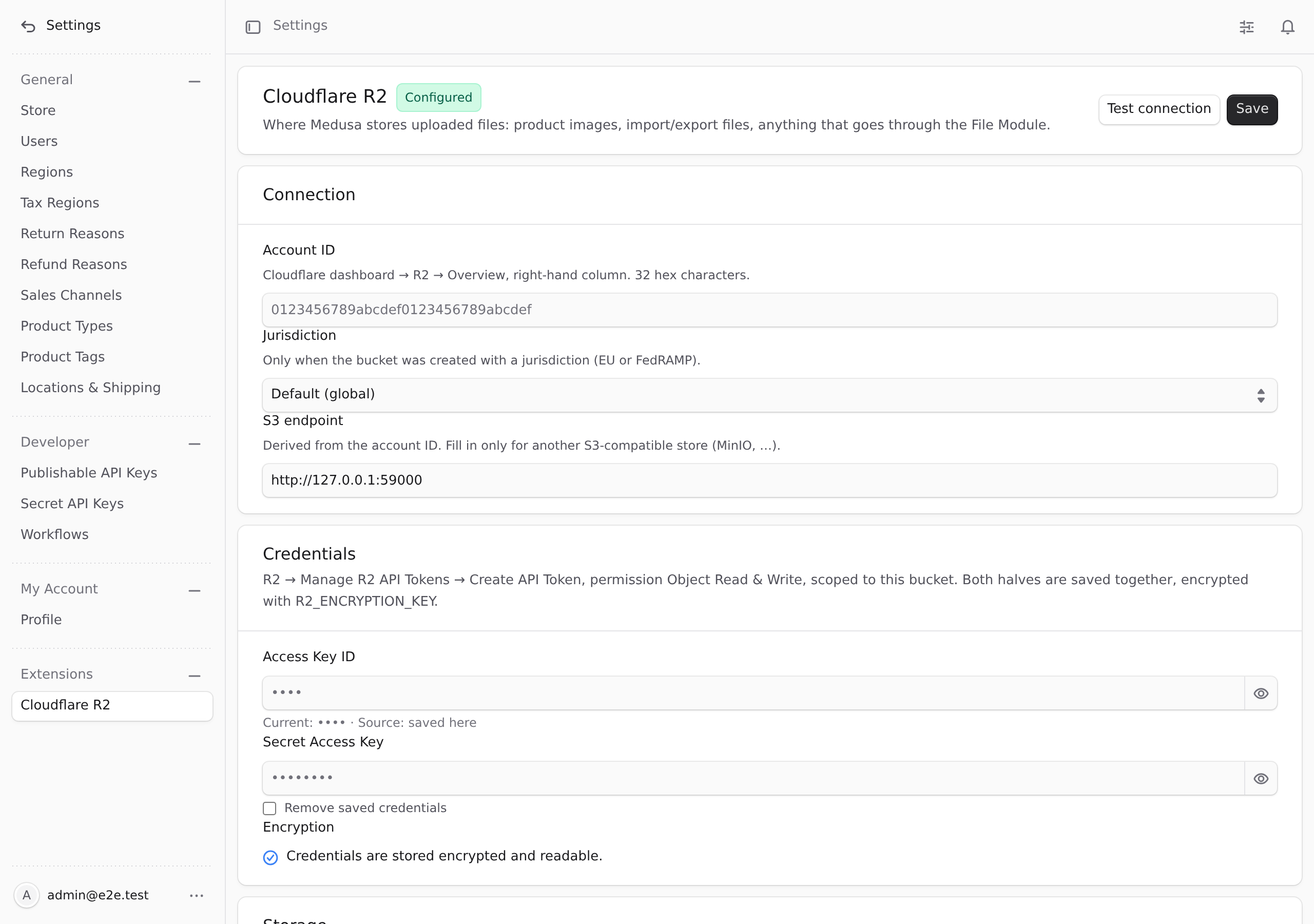
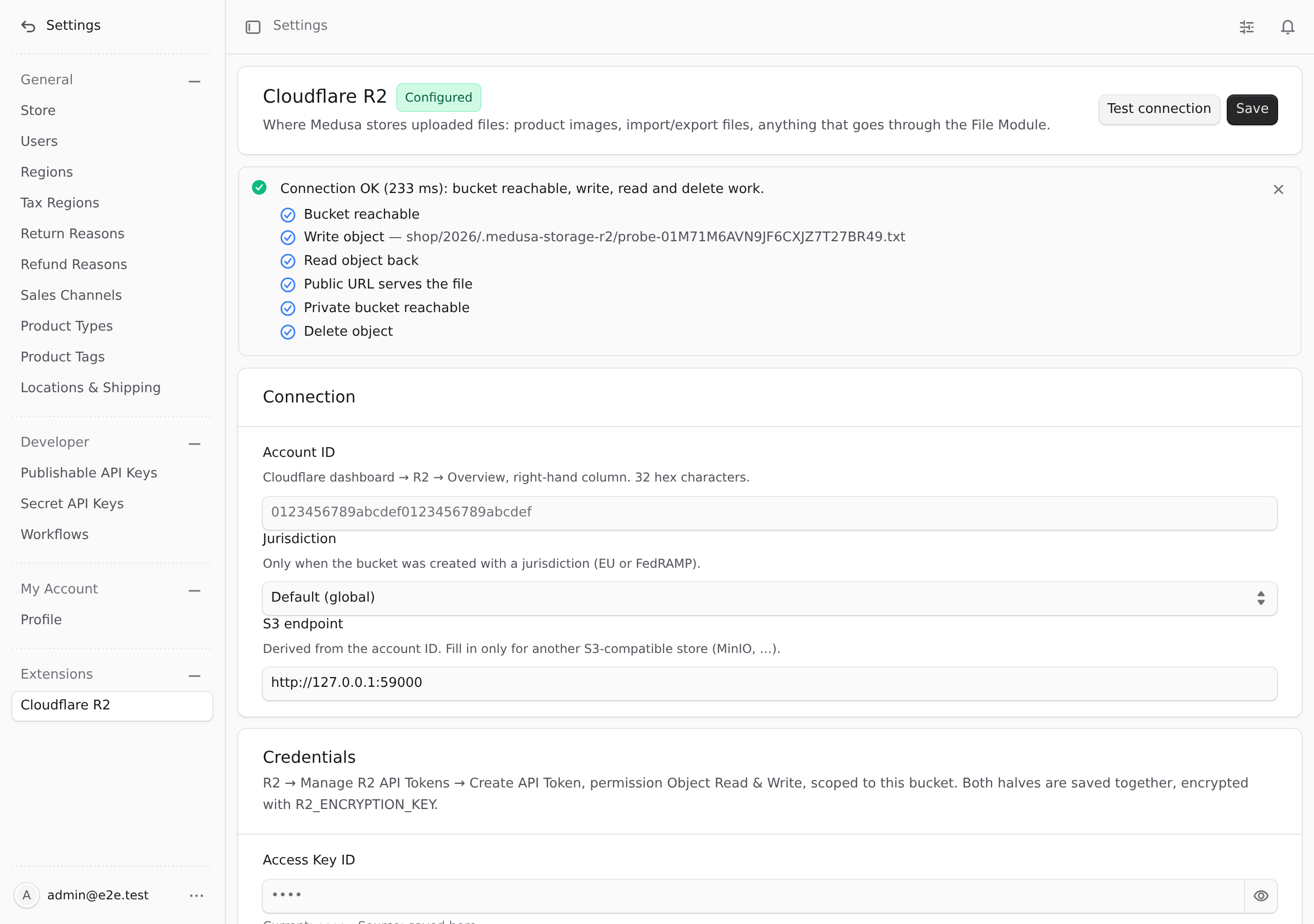
npx medusa db:migrateThen open Settings → Cloudflare R2 in the Admin, fill in the account ID, access key, secret, bucket and public URL, press Test connection, then Save. The next upload goes to R2. Full steps: Installation · Cloudflare setup · Configuration.
| Settings page | Connection test |
|---|---|
 |  |
English
Features
- File Module provider for Cloudflare R2: upload, streamed (multipart) upload, delete, presigned download URLs, presigned upload URLs, download stream and buffer: everything Medusa's Admin, import/export and your own code use.
- Configured in the Admin: account ID, jurisdiction (default / EU / FedRAMP), bucket, public URL, folder prefix, optional private bucket, Cache-Control, link lifetimes. No redeploy to change a bucket or rotate a token.
- Credentials encrypted at rest (AES-256-GCM, key from ), shown masked, saved as a pair. Fallback order: Admin → provider options → environment variables.
- Test connection before saving: HEAD bucket, write a probe object, read it back, fetch it through the public URL, HEAD the private bucket, delete the probe. Each step is reported, so "the r2.dev URL is not enabled" or "the token lacks write permission" is one line, not a guessing game.
- Public and private files: public files get ; files Medusa marks private (exports, imports) go to the private bucket and are served through presigned links. Without a private bucket a private file is rejected, never written to the public bucket.
- Content type from the bytes (PNG, JPEG, WebP, AVIF, HEIC, GIF, SVG, PDF, MP4, …), not from what the browser claims; on private objects; optional size limit.
- Retries and timeouts for the transient errors R2 and the network produce (adaptive retry, 4 attempts, 5 s connect / 30 s request), never for 4xx.
- CORS for browser uploads: Test connection reports whether the Admin origin may upload; Apply CORS adds the rule, or hands you the policy JSON when the token may not.
- Change log of the settings (who, when, which fields; never values) and a command to rotate .
- Migration command from () or S3 to R2: dry run, per-file verification, CSV report, URL rewrite in the database, resume and rollback; sources are never deleted.
- Cloudflare Image Transformations (optional): a URL template such as for every public file URL.
- S3-compatible stores through a custom endpoint (MinIO, RustFS, Garage, …), which is also how the end-to-end tests run; a second suite runs weekly against a real R2 bucket.
- English and Indonesian Admin texts.
Requirements
- Medusa 2.19 or newer 2.x (tested in CI on 2.19.0 and 2.22.2), Node 20.19+ or 22.12+.
- A Cloudflare account with R2 enabled and one bucket (two if you want private files kept apart).
Installation
: register the plugin and make it the File Module's provider. Medusa uses one file provider at a time, so this replaces (or ).
Then run the migration and set the encryption key:
Until the store is configured, uploads fail with ; nothing else in Medusa is affected.
Cloudflare setup
- Bucket: Cloudflare dashboard → R2 → Create bucket. Note the Account ID shown on the R2 overview page.
- Public access (so product images have a URL): bucket → Settings → Public access. Either enable the subdomain (development; rate limited) or connect a custom domain on your zone (production). The resulting or is the plugin's Public URL.
- API token (least privilege): R2 → Manage R2 API Tokens → Create API Token:
- Permission Object Read & Write (not Admin): the plugin only reads, writes and deletes objects.
- Specify bucket(s): only the bucket(s) of this store. A token for all buckets is not needed.
- TTL: forever, or rotate on a schedule (saving a new pair in the Admin takes effect at once).
- Copy the Access Key ID and Secret Access Key (the S3 pair, not the Cloudflare API token). The only operation that needs Admin Read & Write is the Apply CORS button; without it the Admin shows the policy to paste by hand (see CORS).
- Optional private bucket for exports and imports: a second bucket without public access, same token.
Configuration
Open Settings → Cloudflare R2 in the Admin:
| Field | Meaning |
|---|---|
| Account ID | 32 hex characters; the S3 endpoint is derived from it. |
| Jurisdiction | , or : only when the bucket was created with one; changes the endpoint host. |
| S3 endpoint | Fill in only for another S3-compatible store. Overrides account ID + jurisdiction. |
| Access Key ID / Secret | The R2 API token pair. Saved together, encrypted; the Admin shows . |
| Bucket | Where public files live. |
| Public URL | or your custom domain. Without it public files get temporary presigned links and a warning is logged. |
| Public URL template | Optional. and placeholders, e.g. for Cloudflare Image Transformations on a custom domain. Empty: . |
| Folder (prefix) | Optional folder inside the bucket. Keys look like . |
| Private bucket | Bucket for files Medusa marks private. Empty: private files are rejected (never stored in the public bucket). |
| Cache-Control | Stored with every public upload. Default (keys are unique). Private objects always get . |
| Download / upload links | Lifetime of presigned links in seconds, 60 to 604800 (7 days, the SigV4 maximum). |
| Max file size | Read-only; set with the provider option (bytes). |
Test connection uses the values in the form (saved or not) and writes one probe object under , which it deletes again.
Lookup order for every value: Admin → provider → environment:
| Env var | Option | Setting |
|---|---|---|
| Account ID | ||
| Jurisdiction | ||
| S3 endpoint | ||
| , | , | Credentials (always both from one source) |
| Bucket | ||
| Public URL | ||
| Folder | ||
| Private bucket | ||
| Public URL template | ||
| Cache-Control | ||
| – | , | Link lifetimes |
| – | Largest upload in bytes (buffers and streams); default unlimited | |
| – | , , | Retry/timeout tuning (defaults 4, 5000, 30000). Only 5xx, 429 and network errors are retried. |
| – | How long a process caches the settings (default 60000) | |
| – | 64 hex chars (). Needed to store credentials in the Admin. Back it up with the database. |
Settings saved in the Admin reach the other Medusa processes (worker) through the event and in any case within .
Private files
Medusa marks some files private (product import/export CSVs, anything your code uploads with ). They go to the private bucket and are only reachable through presigned links (). If no private bucket is set, such an upload fails with This is deliberate: a public bucket serves every key it holds, and a ULID in the name is not a secret. Private objects are stored with .
CORS (browser uploads)
CORS on the bucket matters only when a browser uploads straight to R2 through a presigned upload URL ( and then from the page). Uploads through the Medusa server never need it.
- Test connection includes a check for the Admin's origin. It is a warning, not a failure.
- Apply CORS (Settings → Cloudflare R2 → Browser uploads) adds this rule for the current Admin origin and keeps the rules already there. It needs a token with Admin Read & Write; with an Object Read & Write token the page shows the same policy to paste into Cloudflare → R2 → bucket → Settings → CORS policy:
Moving an existing store to R2
Files uploaded before the switch stay where they were (for : on the server) and their URLs in the database still point there. copies them into the bucket, verifies every copy and rewrites the URLs. Options are plain words ( does not accept ):
| Word | Meaning |
|---|---|
| (default) / | Where the files are now. reads , , , , optional , from the environment. |
| : the folder wrote to (default ). | |
| The prefix the stored URLs start with (: ). Only URLs under it are migrated. | |
| Columns to scan and rewrite; add your own . Default: the two product image columns. | |
| Where the CSV report and go (default ). | |
| , , , | As above; copies and verifies but leaves the database alone. |
Each file is streamed to R2 under (names unchanged, so a URL maps to one key), its content type is sniffed, the size on R2 is compared with the bytes read and the MD5 with R2's ETag (single-part uploads); the SHA-256 is in the report. A URL is rewritten only after its file verified. Nothing is ever deleted: remove yourself once the store runs fine on R2.
Next.js storefront
Allow the public host in :
With a URL template for Cloudflare Image Transformations you can also set (or a custom ) and let Cloudflare resize instead of Next.
Rotating the encryption key
The stored access key and secret are decrypted with the old key and re-encrypted with the new one in place; the change log records the rotation with both key fingerprints (never the keys). A running process with the old key reports "key mismatch" until it is restarted.
Troubleshooting
| Symptom | Cause / fix |
|---|---|
| Test connection: → / | Wrong secret, or the token is not scoped to this bucket. Create a new token (Object Read & Write, this bucket). |
| Test connection: shows a ⚠ "HEAD bucket not permitted" | Normal for an Object Read & Write token: R2 may refuse . The probe object then proves the bucket; the test is still OK when write/read/delete pass. |
| → / | Bucket name typo, or the bucket lives in another jurisdiction (EU/FedRAMP) than the one selected. |
| → / | Account ID wrong (the endpoint host is derived from it). |
| → or | Public access is not enabled on the bucket, the Public URL belongs to another bucket, or a custom domain is not active yet. |
| → timeout | The r2.dev subdomain is rate limited; use a custom domain in production. |
| warning | Only matters for presigned browser uploads; see CORS. |
| Upload: | Set a private bucket. The plugin never puts private files in the public bucket. |
| Upload: | provider option. |
| The key changed after the credentials were saved: run the rotation command with the old key, or enter the credentials again. | |
| / errors with another S3 store | The client already sends checksums only ; update the store (MinIO ≥ 2025, RustFS) or report an issue. |
| Images missing after the migration | did not match the stored URLs exactly (scheme, host, ); check the CSV report and run again. |
Plugin options
(default ) shows the small "by Haus Kayu" line under the settings page.
FAQ
Does R2 need ACLs? No, and the plugin never sends any. Public access is a bucket-level setting in Cloudflare; the plugin only decides which bucket an object goes to.
Why does return a presigned URL for a public file? That route always asks the provider for a presigned download link; product images and other public files keep their plain public URL in the database.
Can I use it without the Admin page? Yes: provider options or variables alone configure it. The Admin page then shows them as read-only hints ().
What if I lose ? Uploads stop with a clear message, the Admin shows "key mismatch", and you enter the access key and secret again. Nothing in the bucket is affected.
Why is the content type sometimes different from what I uploaded? The plugin looks at the first bytes. A PNG uploaded as is stored as ; a keeps its declared type (it is a zip inside). Plain text and unknown formats keep the declared type or fall back to the extension.
Unicode file names arrive garbled () — Medusa's multipart parser decodes names as latin1; the plugin repairs such names to UTF-8 before building the key.
Security
- Secrets are never returned by any route or written to logs; the Admin receives + the last four characters of the access key ID only.
- Ciphertext format (AES-256-GCM, 96-bit IV, the column name as AAD) and a key fingerprint next to it, so a changed key is reported instead of producing garbage.
- File names are sanitized (, leading slashes and segments removed) and every stored key carries a ULID.
- All Admin routes require an authenticated Admin user; request bodies are validated with strict schemas.
- Every change to the settings is logged in (user, time, field names, and for CORS the origin); values never are. The log is shown on the settings page.
- See SECURITY.md for reporting and operating guidance.
Bahasa Indonesia
Fitur
- Provider File Module untuk Cloudflare R2: unggah, unggah streaming (multipart), hapus, tautan unduh presigned, tautan unggah presigned, stream dan buffer: semua yang dipakai Admin Medusa, impor/ekspor, dan kode Anda sendiri.
- Diatur dari Admin: Account ID, yurisdiksi, bucket, URL publik, folder, bucket privat opsional, Cache-Control, masa berlaku tautan. Ganti bucket atau rotasi token tanpa deploy ulang.
- Kredensial terenkripsi (AES-256-GCM, kunci dari ), ditampilkan tersamar, disimpan berpasangan. Urutan fallback: Admin → opsi provider → environment variable .
- Tes koneksi sebelum menyimpan: cek bucket, tulis objek uji, baca ulang, ambil lewat URL publik, cek bucket privat, hapus. Tiap langkah dilaporkan terpisah.
- File publik dan privat: file publik dapat ; file yang Medusa tandai privat (ekspor, impor) masuk ke bucket privat dan dilayani lewat tautan presigned. Tanpa bucket privat, file privat ditolak, tidak pernah ditulis ke bucket publik.
- Content type dari isi file (bukan dari klaim browser), untuk objek privat, batas ukuran opsional, retry + timeout untuk gangguan sementara (5xx/429/jaringan).
- CORS untuk unggah dari browser: tes koneksi melaporkan status CORS, tombol Terapkan CORS menambah aturannya (atau memberi JSON-nya kalau token tidak berhak).
- Riwayat perubahan pengaturan (siapa, kapan, field apa; tanpa nilai) dan perintah rotasi .
- Perintah migrasi dari () atau S3 ke R2: dry-run, verifikasi per file, laporan CSV, URL di database diperbarui, resume dan rollback; file sumber tidak pernah dihapus.
- Template URL opsional untuk Cloudflare Image Transformations ().
- Teks Admin dalam Bahasa Indonesia dan Inggris.
Kebutuhan
- Medusa 2.19 atau 2.x yang lebih baru (diuji di CI pada 2.19.0 dan 2.22.2), Node 20.19+ atau 22.12+.
- Akun Cloudflare dengan R2 aktif dan satu bucket (dua kalau file privat mau dipisah).
Pasang
Di , daftarkan plugin dan jadikan provider File Module (menggantikan / ; Medusa hanya memakai satu provider file):
Lalu:
Setup di Cloudflare
- Bucket: dashboard Cloudflare → R2 → Create bucket. Catat Account ID di halaman overview R2.
- Akses publik: bucket → Settings → Public access. Aktifkan subdomain (untuk development, dibatasi rate limit) atau hubungkan custom domain (produksi). URL yang didapat adalah URL publik di plugin.
- Token API (hak seminimal mungkin): R2 → Manage R2 API Tokens → Create API Token, izin Object Read & Write (bukan Admin), dibatasi ke bucket toko ini saja. Salin Access Key ID dan Secret Access Key (pasangan S3, bukan token API Cloudflare). Hanya tombol Terapkan CORS yang butuh Admin Read & Write; tanpa itu Admin menampilkan JSON kebijakan untuk ditempel manual.
- Bucket privat untuk ekspor/impor: bucket kedua tanpa akses publik, token yang sama. Tanpa ini, file privat ditolak (tidak pernah jatuh ke bucket publik).
Konfigurasi
Buka Settings → Cloudflare R2 di Admin, isi Account ID, kredensial, bucket, dan URL publik, klik Tes koneksi, lalu Simpan. Unggahan berikutnya langsung ke R2, tanpa restart. Arti tiap kolom dan daftar environment variable ada di bagian Configuration di atas.
Pindah dari penyimpanan lokal
File yang diunggah sebelum pindah tetap di dan URL-nya di database masih menunjuk ke sana. Perintah menyalinnya ke bucket, memverifikasi tiap salinan (ukuran + MD5/SHA-256), menulis laporan CSV, dan memperbarui URL di + (tabel lain lewat ). Jalankan dulu, lalu tanpa kata itu; melanjutkan yang gagal, mengembalikan URL lama. File sumber tidak pernah dihapus. Detail opsi di bagian Moving an existing store to R2.
Rotasi kunci enkripsi: , lalu ganti kunci di semua proses dan restart.
Development
Testing against real R2
CI runs the suite against RustFS on every push and against a real R2 bucket weekly and on demand (workflow "R2 live"). It needs the GitHub Environment (repository → Settings → Environments → New environment):
- In Cloudflare create a throw-away bucket (e.g. ), enable its r2.dev public access, and an API token with Object Read & Write scoped to that bucket only. Optionally a second bucket without public access for the private-file checks.
- In the environment add secrets , and variables , , (the r2.dev URL), optionally , .
- Actions → R2 live → Run workflow. Without the secrets the job logs a notice and ends as skipped, not failed.
Every run writes under a unique prefix and deletes it at the end. The bucket's CORS policy is changed only when the token may do so (an Admin token); with an Object Read & Write token that path is asserted to fail cleanly. Locally: .
Built for hauskayu.com
hauskayu.com, the Haus Kayu store (teak furniture and crafts from Jepara), is moving its product images and documents from the server's disk to R2 with this plugin, next to its payment and shipping plugins.
Other plugins by Haus Kayu
- medusa-payment-doit: doit.id payments (QRIS, Virtual Account) for Indonesia.
- medusa-payment-manual-transfer: manual bank transfer with payment-proof upload and admin verification.
- medusa-fulfillment-zone-rate: calculated shipping by zone and chargeable weight, with shipment tracking.
About Haus Kayu
Haus Kayu makes custom teak furniture and wooden crafts in Jepara, Indonesia, and runs its own store on Medusa. The plugins we need and cannot find, we build and publish.
Support
- Issues and feature requests: GitHub issues
- E-mail: dev@hauskayu.com
Disclaimer
This is a community plugin, not a Cloudflare product. Cloudflare and R2 are trademarks of Cloudflare, Inc.; MinIO and RustFS of their respective owners. Use at your own risk; see the license.
License
MIT © Haus Kayu